
A restaurant’s ordering site doesn’t have to look broken to be compromised. Orders might still arrive, the menu might load normally, and customers might complete checkout while an unauthorized account or injected script sits unnoticed in the background.
That’s what makes WordPress security uncomfortable: visible uptime and actual safety aren’t the same thing. AI adds another complication by helping attackers examine software, connect weaknesses, and scale parts of their work faster than before.
But faster attacks don’t make good security pointless. They make slow, informal maintenance harder to defend. For WordPress and WooCommerce businesses, the practical goal in 2026 is to shorten the time between a problem appearing, someone noticing it, and a useful response happening.
You don’t need to become a malware researcher to do that. You need clear responsibilities, layered protection, and a recovery plan that works when your busiest trading period is already underway.
Start With What Your Website Stands to Lose
Security decisions become easier when you stop treating a website as a collection of plugins and start treating it as part of the business.
For a restaurant, the website might carry delivery addresses, phone numbers, order histories, staff accounts, and connections to payment and kitchen systems. A retailer may also depend on inventory feeds and marketplace integrations. Even a simple brochure site has something an attacker can use: hosting resources, a trusted domain, and access to its visitors.
Most opportunistic attackers aren’t interested in your brand personally. They’re interested in what they can extract or misuse. A compromised site can distribute spam, redirect visitors, host fraudulent pages, or contribute computing resources to attacks elsewhere.
Small sites aren’t automatically safe. Automation can make many low-value compromises worthwhile in aggregate.
My preferred starting point is straightforward: write down what must keep working, what information must stay private, and who can change either. That short inventory will tell you more about your priorities than a dashboard full of unexplained security scores.
What AI Actually Changes About WordPress Attacks
Automated attacks existed long before generative AI. Password guessing, vulnerability scanning, and mass exploitation aren’t new inventions. The change is that AI can assist with tasks that previously required more manual investigation, interpretation, and experimentation.
More software can be examined more quickly
AI-assisted tools can help review code, identify suspicious patterns, and generate test cases. That can accelerate legitimate security research, but attackers can use similar assistance to investigate potential weaknesses.
There’s a qualification here: an AI-generated finding isn’t proof of a vulnerability. Models can misunderstand code, overlook prerequisites, and produce convincing reports about problems that don’t exist. Validation still matters.
Separate weaknesses can become one attack path
A small information leak might appear relatively harmless. So might an overly generous permission setting somewhere else. Together, under particular conditions, they could create a more serious problem.
AI can help researchers explore those relationships across larger codebases. It doesn’t magically bypass every security boundary, but it can reduce the effort involved in investigating complicated sequences.
This is why “that feature doesn’t handle payments” isn’t a complete security argument. A weakness outside checkout can still affect the wider site.
Public fixes can give attackers useful clues
Once a security update becomes available, the differences between old and new code may reveal what was wrong. Attackers can study those changes and look for sites that haven’t updated.
The exploitation window varies by vulnerability. Some flaws require unusual configurations or authenticated access; others are easier to attack broadly. There’s no honest universal countdown. Still, treating every security update as something that can wait until next month is increasingly difficult to justify.
[IMAGE: Diagram showing how code analysis, connected weaknesses, and delayed updates can create a WordPress attack path]
Build Protection Around Failures, Not Promises
No plugin, host, or AI feature can guarantee that a WordPress site will never be compromised. A better design assumes that one safeguard might fail and puts another behind it.
Think of your defenses as having three jobs: prevent common problems, detect suspicious activity, and limit the damage when something slips through.
Protect the hosting environment
Your host controls parts of the system that WordPress plugins can’t fully manage. That includes account isolation, operating-system maintenance, parts of the network configuration, and access to server-level activity.
Ask specific questions rather than accepting “security included” as an answer. Does the service detect malware or also remove it? Are backups separated from the live hosting account? Who responds to an urgent incident outside office hours? Can the host apply temporary protections while a software patch is being prepared?
A confident answer is useful, but documentation and clear service boundaries are better. You should know what the host handles and what remains your responsibility.
Protect the application and its users
At the WordPress level, keep supported software current, restrict privileges, and monitor meaningful changes. A web application firewall can block some malicious requests, but it won’t fix a compromised administrator’s email account or guarantee protection against every vulnerability.
File monitoring and behavioral detection add another perspective. An unexpected executable file, a new administrator, or unusual outbound connections may deserve investigation even when no known malware signature matches.
The strongest arrangement isn’t necessarily the one with the most security plugins. Overlapping tools can duplicate alerts, complicate troubleshooting, and consume resources. Choose layers with distinct jobs.
Make Updates Fast Without Gambling With Checkout
“Update immediately” sounds simple until you run a WooCommerce store. A broken delivery selector or payment flow can cost money within minutes. That concern is legitimate, but indefinite delay isn’t a workable alternative.
The answer is a release process that distinguishes urgent security work from routine feature changes.
Set an update policy before an emergency
Keep automatic WordPress security updates enabled where supported, and confirm that they actually succeed. For plugins and themes, decide which updates can run automatically and which require a quick compatibility check.
Base that decision on business impact, vendor communication, and your ability to detect failures. Don’t assume an automatic-update toggle removes the need for monitoring.
When an actively exploited vulnerability affects your installed version and configuration, prioritize the fix. If a patch isn’t available, ask your technical team or host whether the affected feature can be disabled or access restricted temporarily. A temporary mitigation should have an owner and a review date.
Keep your business-critical tests short and repeatable
A restaurant ordering system needs a different smoke test from a publishing site. After a significant update, check that a customer can choose items and modifiers, select a fulfillment method, complete checkout, and receive confirmation.
Then verify the operational side: did the order appear where staff expect it, reach the kitchen display, and print if printing is part of the workflow?
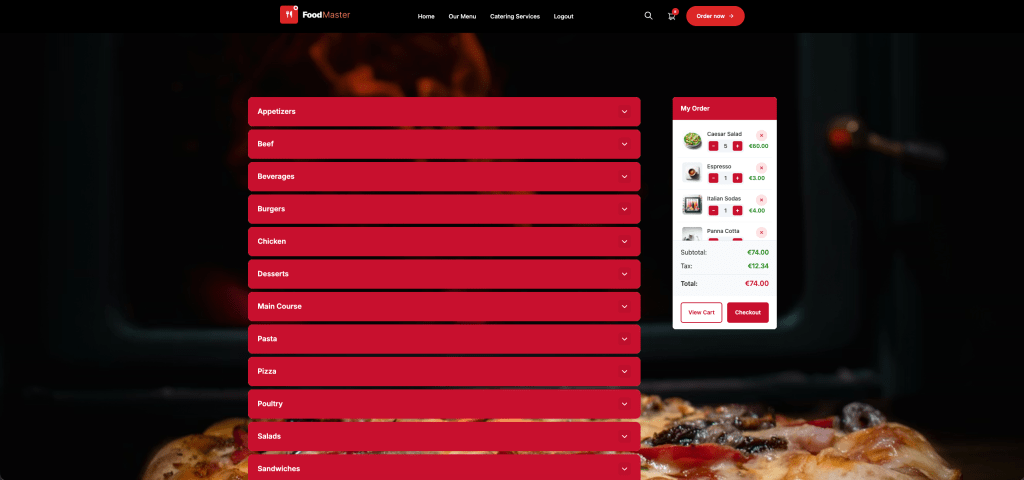
For businesses building around WooCommerce, FoodMaster’s restaurant ordering system brings delivery, pickup, dine-in ordering, POS, kitchen display, QR table ordering, and automatic printing into one product. That gives you a clear set of connected workflows to test rather than treating checkout as the finish line. It supports zero-commission ordering, though payment processing and infrastructure costs still apply.
Those operational features aren’t a substitute for security controls. They simply make it especially important to test the entire journey from customer selection to food preparation.
Don’t restore a vulnerable version casually
If an update breaks something, rolling back may appear to solve the immediate problem. But returning to a version with a known vulnerability can reopen the original exposure.
Where possible, isolate the compatibility issue, involve the developer, and use a temporary mitigation while correcting it. A rollback should be a deliberate risk decision, not an automatic reflex.
Treat Plugin Supply Chains as Part of Your Security
A plugin can become risky for reasons beyond an ordinary coding mistake. A developer account might be stolen, a release process compromised, or ownership transferred to someone with different intentions.
That creates an awkward tension: businesses need patches quickly, but they also need confidence that updates are legitimate.
Release checks, stronger developer authentication, and controlled publishing processes can help address supply-chain risk. Emergency security releases also need a route through those controls without unnecessary delay. The useful principle is verified urgency, not “always wait” or “always trust.”
As a site owner, you can reduce exposure without auditing every line of PHP:
- Install software from its legitimate distribution channel, not redistributed premium-plugin bundles.
- Remove unused plugins and themes instead of keeping them indefinitely as backups.
- Watch for unexplained ownership changes, unusual update instructions, or requests to disable security controls.
- Prefer developers with clear support routes, maintained documentation, and a recognizable security-reporting process.
- Maintain an inventory that identifies who owns each plugin license and receives update notices.
Plugin count alone is a poor measure of safety. Ten well-maintained plugins can be a better choice than three neglected ones. Each component should earn its place through a real business requirement and ongoing maintenance.
Your Administrator’s Inbox Is Part of the Attack Surface
Some compromises don’t require a sophisticated software exploit. They begin with a reused password, a convincing phishing message, or an email account that can reset access to everything else.
AI can help personalize phishing and organize stolen information. But credential reuse was dangerous before AI and remains dangerous for the same reason: one exposed password can unlock unrelated accounts.
Use unique passwords stored in a password manager. Enable multifactor authentication for WordPress administrators, hosting, domain registration, business email, and any payment or integration account that supports it.
Email deserves particular attention because it often controls password recovery. Protecting WordPress while leaving its recovery inbox weak is like reinforcing the front door and leaving the spare key outside.
Give staff the access their work requires
A person handling orders shouldn’t automatically receive permission to install plugins, change site settings, or create administrators. Use individual accounts with appropriately limited roles, and review how custom plugins implement those permissions.
Shared accounts make both security and troubleshooting harder. If several employees use one login, identifying who changed a setting becomes guesswork.
Remove access promptly when staff or contractors leave. Include application passwords, API credentials, active sessions, and external services in that review—not just the visible WordPress user list.
Use breach alerts as warnings, not reassurance
Credential-exposure monitoring can help flag known breaches associated with your email addresses. It cannot prove that an account is safe, and absence from a database doesn’t mean a password has never leaked.
If you receive a credible alert, change reused credentials, review recent access, and revoke suspicious sessions. Never submit a current password to an unfamiliar website claiming it can check whether you’ve been hacked.
Use AI Defensively, With Boundaries
AI can be useful for summarizing logs, explaining security advisories, reviewing code changes, and helping technical teams triage reports. These are practical uses—not reasons to hand over unrestricted control of a live store.
The tricky part is that the material an AI analyzes may itself be hostile. A compromised webpage, support message, or log entry can contain text designed to redirect an assistant’s behavior. This is commonly described as prompt injection.
If you connect an AI assistant to WordPress or WooCommerce, limit what it can read and change. Start with read-only access where practical. Require human approval for sensitive actions such as changing permissions, installing software, exporting customer information, or issuing refunds.
Keep customer data, credentials, and payment-related information out of general-purpose prompts unless you’ve assessed the tool’s privacy terms and configured an appropriate workflow.
AI-generated fixes also need review and testing. Code that appears to solve an error can introduce a permission bypass or disable an essential check. An assistant’s confidence is not a security test.
[IMAGE: WordPress store security workflow showing limited AI access, human approval, monitoring, and tested backups]
Plan for Recovery Before You Need It
Backups are essential, but “we have backups” leaves several questions unanswered. How recent are they? Are they protected from the same credentials used on the live site? Has anyone successfully restored one?
For ecommerce, backup frequency should reflect the amount of order data you can afford to lose. Restoring yesterday’s database might recover the website while removing today’s orders from its records.
That’s why recovery needs to account for transactions, not just files. You may need to reconcile payment records, order notifications, fulfillment activity, and changes made after the backup was created.
Write a one-page incident procedure
A useful incident plan should be readable under pressure. Include the person authorized to act, the host’s emergency contact route, where backups and logs are stored, and how to temporarily stop affected transactions.
- Contain the issue. Restrict affected functionality or access with technical guidance.
- Preserve evidence. Retain relevant logs and snapshots before cleanup where feasible.
- Find and close the entry point. Removing visible malware alone may leave the original weakness intact.
- Recover carefully. Restore clean components, reconcile orders, and rotate affected credentials from a trusted device.
- Verify and communicate. Test the site, monitor for recurrence, and assess notification obligations.
A compromised store may raise privacy, contractual, or regulatory responsibilities. The appropriate response depends on what happened and which information was affected. Get qualified advice rather than assuming every incident requires the same notification—or none at all.
A Manageable Security Routine for 2026
WordPress benefits from public scrutiny and coordinated security work. Open code allows independent researchers to investigate problems and help improve fixes. It also gives attackers visibility. The advantage comes from active maintenance and responsible coordination, not from openness alone.
You can’t control that entire ecosystem. You can control whether your site receives its improvements promptly and whether someone notices when something goes wrong.
This week, identify who handles urgent updates, verify your administrator accounts, and confirm that a backup can be restored. Next, document a short checkout test and clarify your host’s incident responsibilities. Those steps won’t produce a dramatic security makeover, but they will remove common sources of confusion.
AI is changing the pace of security work. Your response doesn’t have to be frantic. Build a system that catches problems early, gives people clear authority to act, and lets the business recover without improvising every decision.
Commission-free ordering
Run restaurant orders on your own WordPress site
FoodMaster adds delivery, pickup, dine-in, POS, and kitchen tools — with zero per-order fees.