
WPSlash

Configuring Delivery & Pickup for Your Restaurant (Order Types Deep Dive)

Thursday January 15, 2026

Setting up the right order types is the core of your restaurant’s digital strategy. Whether you’re offering local delivery or in-store pickup, FoodMaster has you covered.

1. Enabling Your Order Types

In the settings, you can toggle which services you provide.
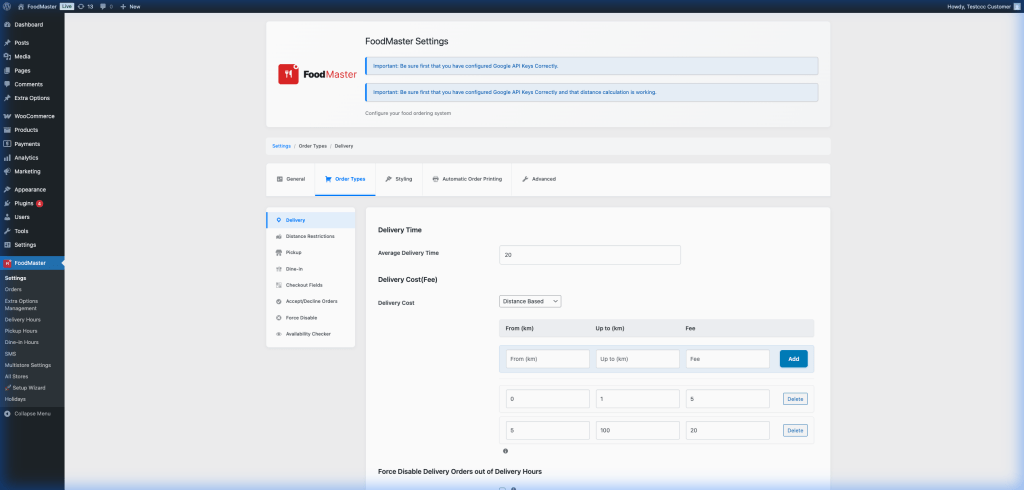
FoodMaster Order Types Configuration

Available Types:

  • Delivery: Bring the food to the customer’s door.
  • Pickup: Customer collects at your location.
  • Dine-In: Customer orders from their table (perfect for QR code menus).

2. Advanced Delivery Rules

Delivery is the most complex part of a food ordering system. FoodMaster gives you deep control:

  • Minimum Order Amount: Ensure deliveries are profitable (e.g., $15 minimum).
  • Distance-Based Fees: Charge more for customers who live further away.
  • Free Delivery Threshold: Offer free delivery for large orders (e.g., “Free delivery over $50”).

3. Streamlining the Pickup Experience

For pickup orders, you can set a “Lead Time” (e.g., 20 minutes) so customers know exactly when their food will be ready. This avoids crowds in your lobby and improves customer satisfaction.

4. Pro Tip: Dine-In QR Codes

If you enable Dine-In, FoodMaster can generate unique QR codes for each table. When scanned, the system automatically knows the table number, allowing the kitchen to deliver food directly to the customer without them ever leaving their seat.


FAQ

Q: Can I disable delivery during busy hours?
A: Yes, you can manually toggle delivery off from the dashboard if the kitchen is overwhelmed.

Q: Does it support different prices for delivery and pickup?
A: You can use WooCommerce’s standard pricing, but add specific delivery fees or discounts for pickup via FoodMaster settings.

Leave a Comment

Your email address will not be published. Required fields are marked *

Related Articles

WooFood

Delivery Hours Management for FoodMaster (formerly WooFood)

Advanced Opening Hours & Holiday Management A reliable restaurant ordering system must know exactly when you are open. Setting accurate hours prevents frustrated customers from placing orders when your kitchen is closed. 1. Setting Regular Business Hours You can set different hours for Delivery and Pickup. This is helpful if your kitchen stops delivery an […]
January 15, 2026
Restaurants WooFood

Why “Free” GloriaFood Might Not Be The Best Long-Term Bet For Your Restaurant

When you’re building an online ordering system for your restaurant, it’s tempting to go for a “free” solution. That’s exactly what GloriaFood offers: a ready-to-go, easy-to-install WordPress plugin for online ordering, delivery, and reservations with no setup fees or commissions But “free” doesn’t always mean “best,” especially when you’re serious about owning your brand, your […]
December 1, 2025
Tutorials WooCommerce

How to Choose the Best Food Ordering System for Your Restaurant (And Why WooFood is the Ultimate Solution)

If you’re running a restaurant, café, or fast-food business in today’s digital age, offering online food ordering is no longer optional — it’s essential. Customers expect the convenience of browsing your menu, customizing their orders, and checking out seamlessly from their phone or computer. But with so many plugins and systems available, how do you choose the right […]
April 21, 2025