
Getting more orders is hard. Getting more out of each order you already have is much easier — and more profitable. Increasing your restaurant’s average order value (AOV) by even 20% does not require more customers, more marketing, or more staff. Here are seven proven strategies that work directly with WooCommerce and FoodMaster.
Why AOV Matters More Than Order Volume
The cost of acquiring a new customer (paid ads, platform listings, promotions) is 5–7× higher than the cost of increasing what an existing customer spends. A restaurant processing 200 orders per week at an AOV of $22 generates $4,400. Push that AOV to $27 — still with the same 200 orders — and you generate $5,400. That extra $1,000 per week, $52,000 per year, costs almost nothing to achieve.
Strategy 1: Use Extra Options to Create Natural Upsells
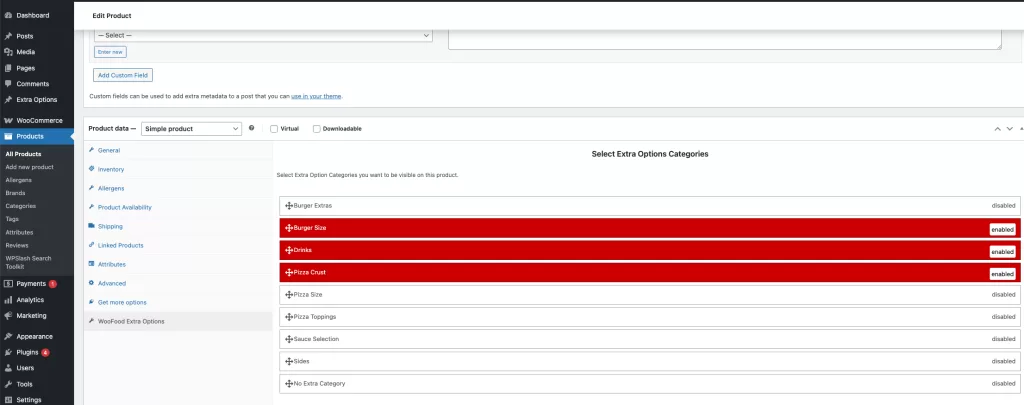
The single most effective AOV tool in FoodMaster is the Extra Options system. When a customer opens a product, they are presented with customisation choices — sizes, add-ons, extras. The key is framing these as enhancements, not just costs:
- “Add extra cheese?” ($1.00) — 40–50% attachment rate in practice
- “Make it a meal?” (fries + drink, +$3.50) — classic bundling
- “Upgrade to large?” — Size upgrades benefit from the decoy effect when three sizes are offered
Strategy 2: Sell Deal Combos and Set Menus
FoodMaster’s Deal Combo product type lets you create fixed bundles at a promotional price — a starter + main + dessert for $28 instead of $35 individually. Combos serve two AOV purposes: they push the customer to a higher total while feeling like they are getting a deal, and they group products in a way that is harder to cherry-pick.
Add combos directly in the WooCommerce product editor using the Deal Combo product type provided by FoodMaster.
Strategy 3: Set Your Free Delivery Threshold Just Above Your Current AOV
If your current AOV is $22, set free delivery above $25. A significant number of customers will add an extra item to reach the threshold — especially if you make it visible in the mini-cart.
Implement this with the woofood_delivery_fee_filter:
add_filter( 'woofood_delivery_fee_filter', 'my_prefix_free_delivery_threshold' );

function my_prefix_free_delivery_threshold( $fee ) {
    $subtotal = WC()->cart ? WC()->cart->get_subtotal() : 0;
    return ( $subtotal >= 25 ) ? 0 : $fee;
}
Pair this with a prominent “Spend $X more for free delivery” message in the mini-cart using the
woofood_minimum_amount_reached_message_minicart filter.
Strategy 4: Optimise Your Minimum Order Amount
Your minimum order amount effectively sets a floor for AOV. If you have no minimum, some customers order a $5 item and pay the full delivery fee — unprofitable for you and poor value for them. A $15–20 minimum for delivery discourages micro-orders and nudges customers to a more sensible basket size without feeling punitive.
Set this under FoodMaster → Settings → Delivery → Minimum Order Amount.
Strategy 5: Suggest Complementary Items in the Cart
WooCommerce supports cross-sells — products suggested in the cart based on what is already in the basket. Set up cross-sells on your most popular products. A burger in the cart might suggest fries, onion rings, or a dessert. This is native WooCommerce functionality that works perfectly alongside FoodMaster.
Set cross-sells on any product under Products → [Product Name] → Linked Products → Cross-sells.
Strategy 6: Add a “Special Requests” Field to Capture More Engagement
A “Special Requests” or “Note” field at checkout keeps customers in the customisation mindset — and customers who engage more with a product tend to order more. FoodMaster’s checkout fields can be configured to include an order notes textarea.
Strategy 7: Run Time-Limited Promotions
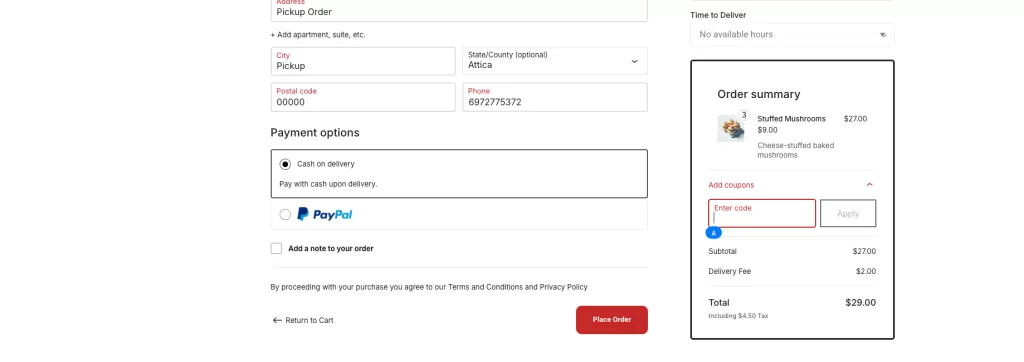
WooCommerce coupons work perfectly with FoodMaster orders. Common high-AOV promotions:
- Spend $30, get 20% off — Creates a strong incentive to build a larger basket
- Free dessert above $25 — Tangible reward that feels like a gift, not a discount
- Happy hour bundle — 2-for-1 on specific items between 15:00–17:00, promoting off-peak ordering
FoodMaster works with all standard WooCommerce coupon types — percentage discounts, fixed cart discounts, fixed product discounts, and free shipping.
Tracking Your AOV
Monitor your progress using FoodMaster → Statistics and WooCommerce → Analytics → Overview. WooCommerce shows average order value natively. Set a baseline before implementing changes, then measure the impact of each strategy over a consistent period (at least two weeks) before drawing conclusions.
Wrapping Up
Increasing AOV is one of the most overlooked levers in restaurant marketing. The strategies above are not tricks — they are value-driven improvements that make ordering easier, more satisfying, and better value for customers, while improving your margin on every order. Start with extra options (strategy 1) and a well-set free delivery threshold (strategy 3) — these two alone typically add 15–25% to AOV within weeks.