
A starter, main, and dessert sitting in a customer’s cart as three separate items might total $32. Package the same three dishes as a “Date Night Set Menu” at $28 and suddenly it sells itself. FoodMaster’s Deal Combo product type is built specifically for this — and it gives you full developer control over how combos behave at checkout.
What Is a Deal Combo in FoodMaster?
A Deal Combo is a custom WooCommerce product type provided by FoodMaster that lets you bundle multiple menu items into a single orderable package. Unlike WooCommerce’s native product bundles (which require a third-party plugin), FoodMaster’s combo type is purpose-built for food ordering and integrates fully with:
- The FoodMaster checkout (delivery, pickup, dine-in)
- Kitchen receipts and printing
- Kitchen Display System (KDS)
- Extra options / add-ons per combo item
Step-by-Step: Creating a Deal Combo
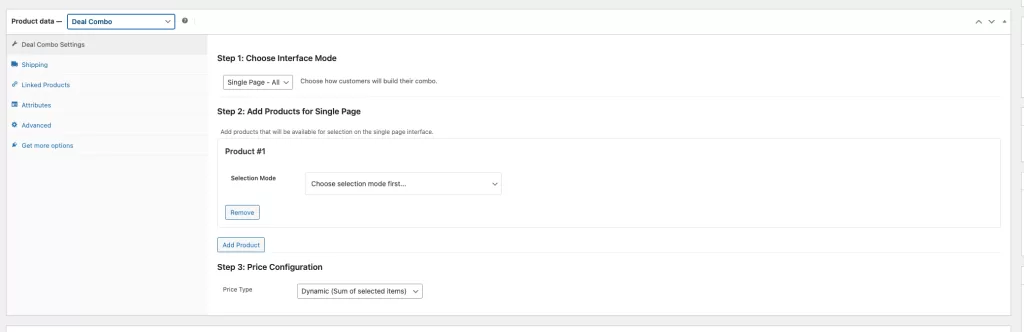
Step 1: Create a New Product
Go to Products → Add New. Give the combo a descriptive name — this is what customers will see on the menu. Examples:
- “Date Night Set Menu for 2”
- “Kids Happy Meal Box”
- “Party Platter (10 people)”
- “Business Lunch Deal”
Step 2: Select Deal Combo Product Type
In the Product Data panel, change the Product Type dropdown to Deal & Combo. The product data panel will update to show FoodMaster’s combo fields.
Step 3: Add Combo Items
In the Combo Items tab, add each dish included in the bundle by searching for and selecting existing WooCommerce products. For each item, specify:
- Quantity — How many of this product is included
- Optional or Required — Whether the customer must include this item or can remove it
Step 4: Set the Combo Price
Set the Regular Price for the combo. This is the total price the customer pays for the bundle — typically 10–25% below the sum of individual item prices. You can also set a Sale Price for time-limited promotions that show a strikethrough original price.
Step 5: Add a Featured Image
Combo products benefit enormously from a well-styled composite photo — show all the dishes in the set together, styled attractively. This is the image customers see on the menu before clicking through.
Pricing Psychology for Combos
Three principles make combo pricing exceptionally effective:
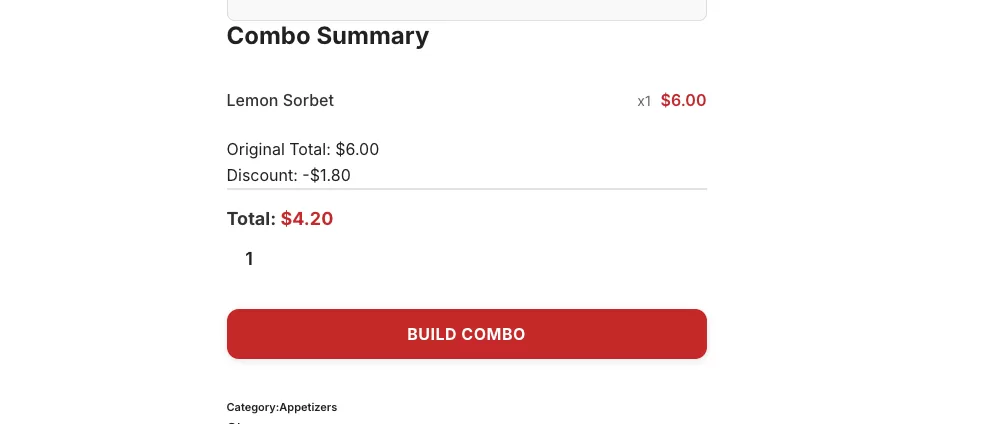
- Show the saving explicitly — If individual items total $34 and the combo is $28, display “Save $6” prominently. Use the WooCommerce sale price feature to show the crossed-out original price.
- Reduce effort — Customers who are unsure what to order often choose a combo because the decision is made for them. Combos remove choice paralysis.
- Anchoring — Position your premium combo near the top of the menu. It makes individual dishes look affordable by comparison and pulls the average basket value up.
Developer Hooks for Deal Combos
FoodMaster provides several filters for programmatic control of combo behaviour:
Change the Add-to-Cart Button Text
add_filter( 'woofood_deal_combo_add_to_cart_text', function( $text ) {
    return __( 'Order This Set Menu', 'my-theme' );
} );
Control Whether a Combo is Purchasable
Temporarily remove a combo from sale (e.g., when a key ingredient is unavailable) without deleting the product:
add_filter( 'woofood_deal_combo_is_purchasable', function( $purchasable, $product ) {
    // Check a custom option set in the product meta
    if ( get_post_meta( $product->get_id(), '_temporarily_unavailable', true ) ) {
        return false;
    }
    return $purchasable;
}, 10, 2 );
Mark a Combo as Virtual (No Physical Delivery)
// Useful for digital gift voucher combos
add_filter( 'woofood_deal_combo_is_virtual', '__return_true' );
Best Combo Ideas for Food Businesses
- Family Feast Box — enough mains + sides + drinks for 4, at a per-head price that beats individual ordering
- Office Lunch Bundle — 5 or 10 individual meal boxes with a shared side, ideal for work delivery orders
- Party Platter — shareable starters/snacks in quantity, designed for events
- Meal Deal — main + side + drink at lunchtime, just like a high-street sandwich meal deal but delivered
- Date Night / Valentine’s Set — premium 3-course set designed for two, promoted seasonally
Frequently Asked Questions
Can customers customise items inside a combo (extra toppings, etc.)?
Yes. FoodMaster’s Extra Options work at the item level inside a combo. If a burger in the combo has a “sauce choice” option group assigned, customers can still select their sauce when adding the combo to their cart.
Are combo products included in WooCommerce reports?
Yes. Combo products appear in WooCommerce product sales reports like any other product. FoodMaster’s statistics panel also includes combo orders.
Can I limit how many combos a customer can order?
Use WooCommerce’s standard stock management. Set a maximum stock count and enable stock management on the combo product — when stock runs out, the combo becomes purchasable no more.
Wrapping Up
Deal combos are one of the easiest ways to increase order value and customer satisfaction simultaneously. They make ordering easier, create a perception of value, and let you move higher volumes of specific products. Set up a few high-value combos, feature them at the top of your menu, and watch your average order value climb.