
Choosing the right food ordering plugin can make or break your restaurant’s online presence. The wrong choice means months of workarounds, missing features, and frustrated customers. The right one means you’re taking orders within the hour.
We tested and compared the most popular WooCommerce food ordering plugins available in 2026. This isn’t a sponsored listicle — it’s a practical breakdown of what each plugin actually does, where it falls short, and which one fits your specific situation.
What We Compared
We evaluated each plugin across the criteria that matter most to restaurant owners:
- Setup speed — how long from activation to taking your first order
- Menu management — how easy it is to create and organize menu items, categories, and variations
- Order types — delivery, pickup, and dine-in support
- Extra options — toppings, add-ons, customizations (critical for food)
- Mobile experience — how it performs on phones, where 70%+ of food orders happen
- Design and theming — visual quality and color customization
- Store hours and scheduling — time-based ordering controls
- WooCommerce integration — how well it works with WooCommerce payments, reports, and extensions
- Pricing — upfront cost and ongoing fees
Here are the five plugins we compared:
- FoodMaster
- RestroPress
- GloriaFood WordPress Plugin
- WPPizza
Let’s break each one down.
1. FoodMaster — The All-in-One WooCommerce Food Ordering System
Best for: Restaurant owners who want a complete, modern food ordering system that works out of the box with WooCommerce — no patchwork of plugins required.
Setup Experience
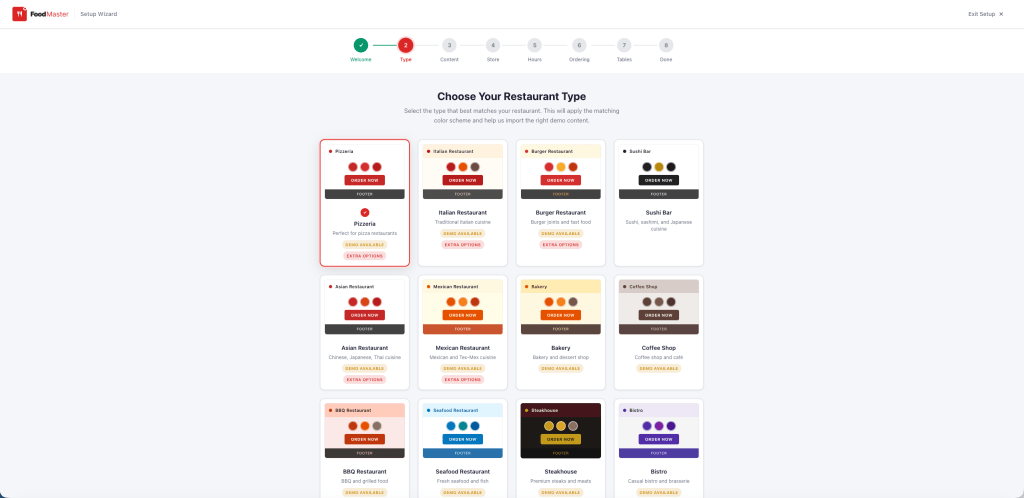
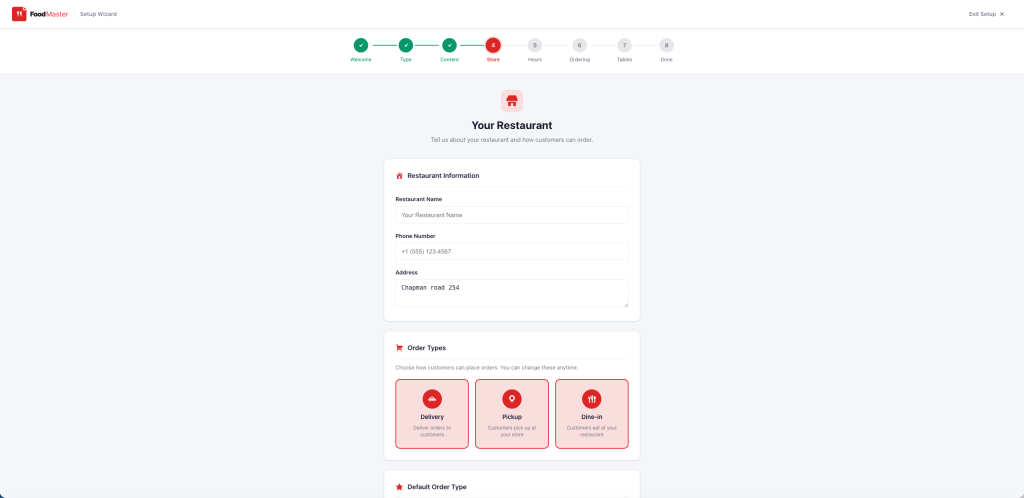
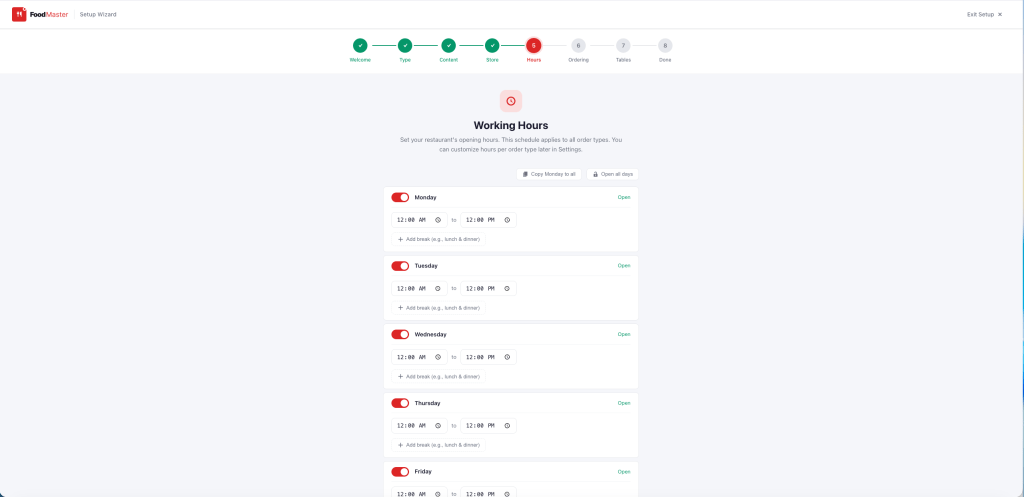
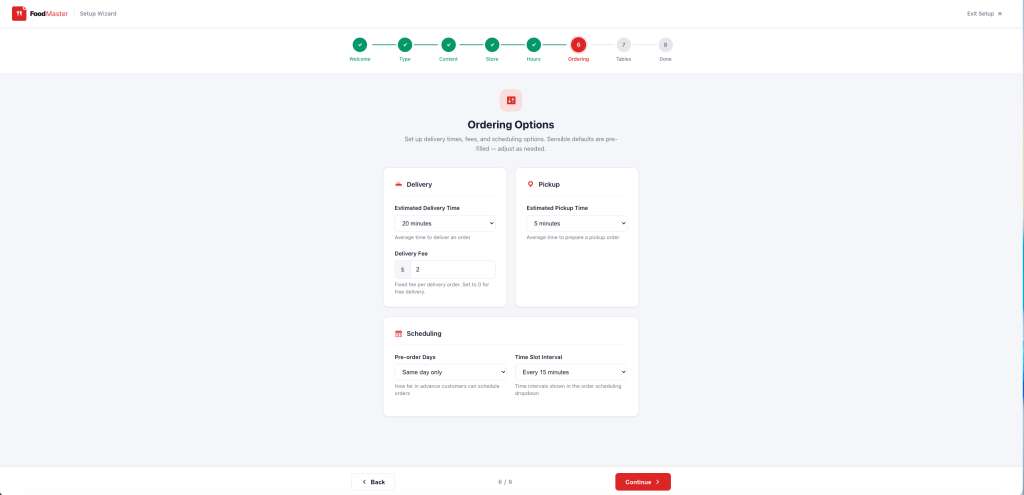
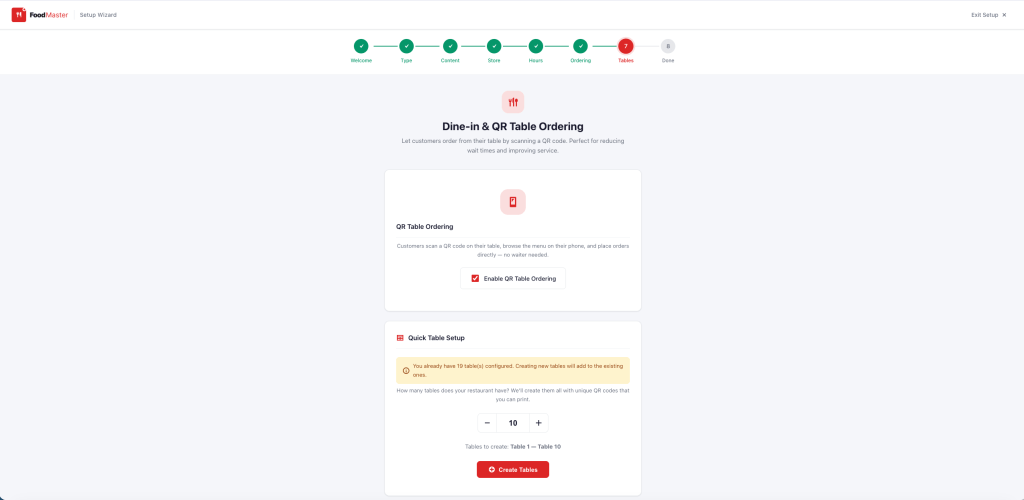
FoodMaster is the only plugin on this list with a full-screen guided setup wizard. After activation, the wizard walks you through 7 steps: choose your restaurant type, import demo content, set store information, configure working hours, set ordering options, and optionally enable QR code dine-in ordering.
The restaurant type selection is especially well done. You choose from 23+ restaurant types (Pizzeria, Burger Joint, Sushi Bar, Coffee Shop, Fine Dining, and more), and each card shows a live color scheme preview — header, background, buttons, footer — so you can see exactly what your site will look like before committing. The matching color scheme is applied site-wide instantly.
Time to first order: Under 10 minutes.
Menu Management
FoodMaster builds on WooCommerce products, which means you get the full power of WooCommerce’s product system — variable products for sizes and options, product categories for menu sections, and all existing WooCommerce extensions. The demo import creates a complete menu with real items, images, categories, and prices specific to your restaurant type.
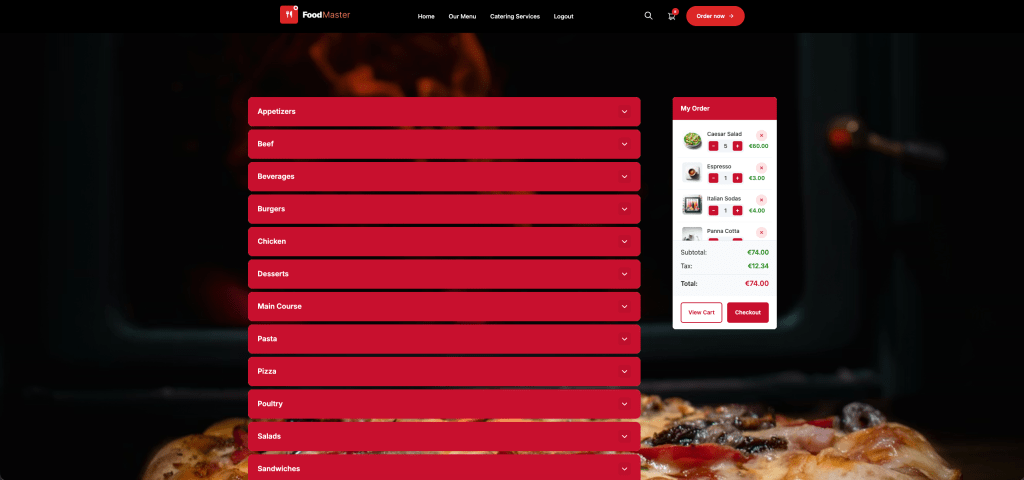
Three menu layouts are included: Accordion (collapsible categories), Side Menu (fixed navigation), and Sticky Tabs (scrolling tabs). All are mobile-responsive.
Ordering and Checkout
This is where FoodMaster really stands apart. The modern AJAX add-to-cart system opens product details in a modal popup — image, description, variations, extra options, quantity controls — without leaving the menu page. No page reloads. It feels like a native food ordering app.
The sticky mini cart on mobile keeps “View Cart” and “Checkout” buttons always visible. The cart, checkout, and single product pages are all styled with the active color scheme, including full support for WooCommerce block-based pages.
Standout Features
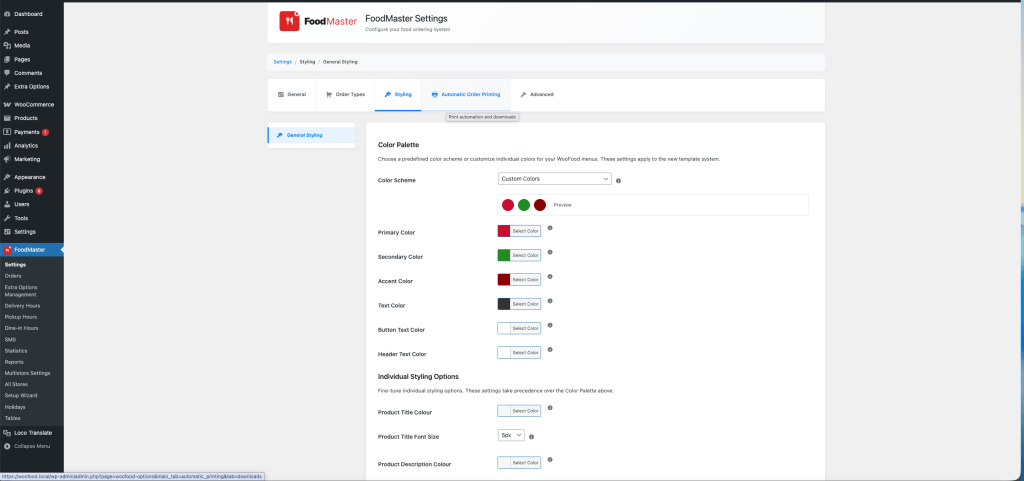
- 23+ restaurant-type color schemes with full palette (12 color variables, WCAG accessible)
- Delivery, pickup, and dine-in with QR code table ordering
- Working hours with break periods, enforced on frontend
- Multi-store support for multiple locations
- Availability checker showing next open time when store is closed
- Extra options system for toppings, sides, and add-ons
- Modern theme included (optional) that inherits all plugin colors
- Bi-directional sync between plugin settings and WordPress Customizer
- Pre-order scheduling with configurable time slots
Limitations
- Premium plugin — not free (but no ongoing commissions per order)
- Requires WooCommerce (though that’s also free)
2. RestroPress — Standalone Restaurant Ordering for WordPress
Best for: Small restaurants that want a free, basic ordering system and don’t need WooCommerce.
Setup Experience
RestroPress has a basic setup flow, but nothing like a guided wizard. You install the plugin, then manually create menu items, configure settings across multiple admin pages, and set up your own pages for the menu and checkout. There’s no demo content import — you build everything from scratch.
Time to first order: 30–60 minutes (depending on how many menu items you need to create).
Menu Management
RestroPress uses its own custom post type for food items — it does not use WooCommerce products. This means you get a clean, food-focused admin interface, but you lose access to WooCommerce’s ecosystem of extensions (payment gateways, shipping, analytics, subscriptions, etc.).
Menu items support categories, add-on groups (toppings), and variable pricing. The frontend menu display is functional but visually basic.
Ordering and Checkout
RestroPress has its own cart and checkout system, separate from WooCommerce. It supports delivery and pickup ordering. The checkout is straightforward but lacks the polish and payment gateway variety of WooCommerce. For payment, you’re limited to RestroPress-compatible gateways — primarily PayPal and Stripe via add-on plugins.
Standout Features
- Free core plugin
- Simple, food-focused admin interface
- Add-on groups for toppings and customizations
- Delivery and pickup support
- Open source with active community
Limitations
- Does not use WooCommerce — you lose the entire WooCommerce ecosystem
- No setup wizard or demo content import
- Basic frontend design — no AJAX modals, no sticky cart, no modern layouts
- No color scheme system — manual CSS required for styling
- No QR code or dine-in ordering
- No multi-store support in core
- No working hours enforcement on frontend (requires add-on)
- Premium add-ons needed for many features (store hours, SMS, tips, etc.)
3. GloriaFood (WordPress Plugin) — Third-Party Widget Embedded in WordPress
Best for: Restaurants that want a free ordering widget quickly and don’t mind their ordering flow being hosted externally.
Setup Experience
GloriaFood is not a WordPress plugin in the traditional sense. It’s an external platform — you create your restaurant account on gloriafood.com, build your menu on their dashboard, then embed a widget on your WordPress site using their plugin. The WordPress plugin simply injects their ordering iframe.
Time to first order: 20–40 minutes (most time spent on the external GloriaFood dashboard, not WordPress).
Menu Management
Your menu lives on GloriaFood’s servers, not in WordPress. You manage items, categories, and options through their web dashboard. This means your menu data is not in your WordPress database — you can’t query it, display it in custom templates, or use it with other WordPress plugins.
Ordering and Checkout
The entire ordering experience happens inside GloriaFood’s embedded widget. It’s functional but branded with GloriaFood’s design. You have limited control over styling, layout, and the checkout flow. Payments are processed through GloriaFood’s system, not WooCommerce.
Standout Features
- Free tier available (with GloriaFood branding)
- Fast to embed — just paste a widget code
- Mobile-optimized ordering widget
- Built-in delivery management and order tracking
- Accepted by many delivery drivers and POS systems
Limitations
- Not a WooCommerce plugin — does not integrate with WooCommerce at all
- Your menu data lives on a third-party server, not your WordPress database
- Limited design customization — you’re using their widget’s look and feel
- GloriaFood branding on free tier; premium required to remove it
- No control over the checkout experience
- No WordPress-native reporting or analytics integration
- Customer data owned by GloriaFood, not you
- If GloriaFood changes pricing or shuts down, your ordering system goes with it
- Premium plans charge monthly fees ($29+/month for advanced features)
4. WPPizza — Legacy Plugin for Basic Pizza Ordering
Best for: Simple pizza shops that want a free, no-frills ordering page and don’t need WooCommerce.
Setup Experience
WPPizza has been around for years. Setup is manual — create items, assign categories, configure settings, and build your own pages. No wizard, no demo content, no guided flow. The admin interface is functional but shows its age.
Time to first order: 45–90 minutes.
Menu Management
WPPizza uses its own custom post type. Menu items support sizes, extras, and categories. The system works but feels dated — no drag-and-drop, no visual builder, no modern product editor.
Ordering and Checkout
WPPizza has its own cart and checkout. It’s separate from WooCommerce. Payment options are limited to PayPal and cash in the free version — you need paid add-ons for Stripe and other gateways.
Standout Features
- Free core plugin
- Specifically designed for pizza (sizes, toppings model)
- Simple and lightweight
- Long track record — been around since 2012
Limitations
- Dated design — no modern AJAX, no modals, no responsive layouts
- Does not use WooCommerce
- Pizza-centric — awkward for non-pizza restaurants
- No color scheme system
- No mobile optimization beyond basic responsive CSS
- No store hours, no dine-in, no QR ordering
- No multi-store support
- Limited payment gateways without paid extensions
- Development pace has slowed significantly
5. WooCommerce + Manual Configuration (DIY Approach)
Best for: Developers and agencies who want full control and are willing to invest significant time in custom development.
Setup Experience
This isn’t a plugin — it’s the approach of using plain WooCommerce with product add-on plugins, custom fields, and manual configuration to build a food ordering system from scratch. You’d typically combine WooCommerce with plugins like “Product Add-Ons”, a delivery date picker, and custom CSS/code for the menu layout.
Time to first order: Days to weeks, depending on your development skills.
Standout Features
- Complete flexibility — build exactly what you want
- Full WooCommerce ecosystem access
- No dependency on a single food ordering plugin
Limitations
- Requires combining 5–10 separate plugins for basic food ordering functionality
- Plugin conflicts are common
- No food-specific features out of the box (store hours, order types, QR ordering)
- Significant custom CSS and possibly PHP development needed
- Ongoing maintenance burden — each plugin updates independently
- No unified design system — visual consistency is your problem
- Much higher total cost when you add up premium add-on plugins
Side-by-Side Feature Comparison
Here’s how each option stacks up across the features that matter most for food ordering:
| Feature | FoodMaster | RestroPress | GloriaFood | WPPizza | DIY WooCommerce |
|---|---|---|---|---|---|
| Uses WooCommerce | Yes | No | No | No | Yes |
| Setup Wizard | Full guided wizard | No | External dashboard | No | No |
| Demo Content Import | 23+ restaurant types | No | No | No | No |
| Time to First Order | Under 10 min | 30–60 min | 20–40 min | 45–90 min | Days–Weeks |
| Color Scheme System | 23+ presets, 12 variables | No | Limited | No | Manual |
| AJAX Add-to-Cart Modal | Yes | No | Widget-based | No | Requires dev |
| Sticky Mobile Cart | Yes | No | Widget-based | No | Requires dev |
| Menu Layouts | Accordion, Side, Tabs | Basic list | Widget layout | Basic list | Manual |
| Delivery + Pickup | Yes | Yes | Yes | Basic | Requires plugins |
| Dine-In / QR Ordering | Yes | No | No | No | Requires dev |
| Store Hours (Enforced) | Yes, with breaks | Add-on | Yes | No | Requires plugin |
| Extra Options / Toppings | Built-in | Built-in | Built-in | Built-in | Requires plugin |
| Multi-Store | Yes | No | Separate accounts | No | Requires dev |
| Pre-Order / Scheduling | Yes | Add-on | Yes | No | Requires plugin |
| WooCommerce Blocks Support | Full styling | N/A | N/A | N/A | Default only |
| Mobile Optimization | Mobile-first design | Basic responsive | Good (widget) | Basic responsive | Manual |
| Data Ownership | 100% yours | 100% yours | Third-party | 100% yours | 100% yours |
| Per-Order Commission | $0 | $0 | $0 (free) / varies | $0 | $0 |
| Dedicated Theme | Yes (Modern Theme) | No | No | No | No |
So Which Plugin Should You Choose?
Here’s the honest breakdown:
Choose FoodMaster if…
- You want a complete solution that works with WooCommerce
- Setup speed matters — you want to be live today, not next week
- Visual design and mobile experience are important to you
- You need delivery, pickup, AND dine-in with QR ordering
- You want a consistent color scheme across your entire site without custom CSS
- You run multiple locations
- You want your data, your customers, your branding — no third parties
Choose RestroPress if…
- You specifically don’t want WooCommerce on your site
- You need a free plugin and are comfortable with a basic design
- You only need delivery and pickup (no dine-in or QR ordering)
- You’re willing to buy add-ons for store hours, tips, and advanced features
Choose GloriaFood if…
- You need the absolute fastest setup possible and don’t care about design control
- You’re okay with your ordering system being hosted by a third party
- You already use GloriaFood and just want to embed it on your WordPress site
- You’re willing to accept limited customization and third-party data ownership
Choose the DIY approach if…
- You’re a developer or agency building a highly custom solution
- You have specific requirements that no plugin covers
- You have the time and budget for ongoing custom development
The Bottom Line
For most restaurant owners, the decision comes down to one question: do you want to spend your time configuring technology, or serving customers?
RestroPress gives you a free starting point but requires significant manual work and leaves you outside the WooCommerce ecosystem. GloriaFood is fast but puts your ordering system — and customer data — in someone else’s hands. WPPizza works for basic pizza shops but hasn’t kept up with modern expectations. The DIY approach is powerful but expensive in time.
FoodMaster is the only option that gives you a modern, mobile-first food ordering experience built natively on WooCommerce — with a guided setup that gets you live in minutes, a professional color scheme system that eliminates CSS headaches, and advanced features like QR table ordering and multi-store support that other plugins simply don’t offer.
Your restaurant deserves an ordering system that looks as good as your food.
Frequently Asked Questions
Can I switch from RestroPress or GloriaFood to FoodMaster?
Yes. Since FoodMaster uses WooCommerce products, you’d create your menu items as WooCommerce products (or use the demo import) and configure your settings through the wizard. Your WordPress site, pages, and content remain untouched. You can deactivate the old plugin once FoodMaster is configured.
Does FoodMaster charge per-order commissions?
No. FoodMaster is a one-time purchase plugin. There are no per-order fees, no monthly subscription, and no commission on your sales. You keep 100% of every order.
Do any of these plugins work without WooCommerce?
RestroPress and WPPizza work independently of WooCommerce — they have their own cart and checkout systems. GloriaFood is entirely external. FoodMaster and the DIY approach require WooCommerce, which is free.
Which plugin has the best mobile experience?
FoodMaster, by a significant margin. It’s the only plugin with a mobile-first architecture: AJAX modal add-to-cart, sticky mobile cart with always-visible checkout buttons, touch-optimized controls, and full-screen product modals that feel like a native app.
Can I use any of these for a food truck or pop-up?
Yes. FoodMaster’s working hours system and pickup ordering are ideal for food trucks. Set your hours for each day, enable pickup only, and share your menu link or QR code at your location.
Ready to try FoodMaster? Follow our step-by-step setup guide to go from zero to a fully functional food ordering website in under 30 minutes.