
A customer searches for pizza nearby, finds your restaurant, and taps the menu link. If that link opens last winter’s PDF—or sends them to the wrong branch—the problem isn’t just SEO. You’ve made ordering harder at the exact moment someone was ready to buy.
WordPress local SEO works best when your Google Business Profile, website pages, and restaurant details tell the same story. For 2026, the practical priorities are still straightforward: make the business easy to understand, give each location a useful home online, and keep the path from search to order short.
How WordPress Local SEO Works and Which Keywords to Target
Google gives local businesses two overlapping routes to visibility. Maps and the local pack—the map-based business results within Google Search—feature Business Profiles. Organic results feature website pages, including your homepage, location pages, and menu.
They influence each other, but they aren’t the same system. A well-built location page can appear in organic results without your restaurant appearing in the local pack for that search. Equally, a nearby restaurant might appear prominently on Maps while its website struggles organically.
Relevance, distance, and prominence
Google describes local rankings in terms of relevance, distance, and prominence. Relevance concerns how closely a business matches the search. Distance considers how far it is from the searcher or the location Google understands from the query. Prominence reflects how well-known the business is, using signals that can include links, reviews, and other information.
You can improve your business information, website, and reputation. You can’t optimize away geography. A delivery area covering an entire city doesn’t make your restaurant equally close to everyone in it.
Map searches to customer needs
For an imaginary single-location restaurant, Maple Street Pizza in Leeds, a sensible keyword map could look like this:
- Homepage: “pizza restaurant in Leeds” and the restaurant’s name.
- Menu page: “Maple Street Pizza menu,” with readable dishes, sizes, and prices.
- Delivery page: “pizza delivery in Leeds,” supported by real coverage areas, fees, and ordering information.
- Visit page: address, directions, and useful neighborhood context.
“Headingley pizza restaurant” might belong naturally on that visit page if the restaurant is actually there. It doesn’t automatically need another landing page. Searches with essentially the same intent usually belong together rather than being split across near-identical pages.
Start with what customers need to accomplish: choose food, check delivery, find the entrance, or book a table. Then use their language in page titles, headings, and copy. Keyword repetition is no substitute for answering the question.
Set Up Your WordPress Website for Local Search
Before polishing location copy, check that search engines can access the site. In WordPress, open Settings → Reading and make sure “Discourage search engines from indexing this site” is unchecked on the live website. Keep appropriate restrictions on staging sites; that checkbox isn’t a security measure.
Also check for page-level noindex settings, password protection, and maintenance screens. A public homepage doesn’t prove the menu is indexable. Search Console’s URL Inspection tool lets you inspect individual URLs and test whether Google can access them.
Choose one SEO plugin and submit its sitemap
Use one primary WordPress SEO plugin to manage titles, descriptions, canonical URLs, and XML sitemaps. Check its documentation for local-business schema support before assuming it includes that feature. Multiple overlapping SEO plugins can generate conflicting instructions rather than extra optimization.
Add your website to Google Search Console and complete ownership verification. A Domain property covers protocols and subdomains but requires DNS verification; a URL-prefix property covers the specified prefix and offers other verification methods.
Find the sitemap address in your SEO plugin’s settings and submit it under Sitemaps in Search Console. Don’t guess the filename: plugin-generated sitemap addresses vary. Submission helps Google discover URLs, but it doesn’t guarantee indexing.
Make the homepage unmistakably local
A useful homepage title might be “Maple Street Pizza | Pizza Restaurant in Headingley, Leeds.” It identifies the business, food, and location without turning into a string of repeated keywords.
The description can support the next action: “Browse our pizza menu, check delivery coverage in Headingley, or order collection from our Leeds restaurant.” Only mention services you provide. Google may generate a different snippet, and the meta description itself isn’t a direct ranking factor.
For one restaurant, display the real-world business name, full address, and main local telephone number on the contact or visit page. Repeat essential contact details in the footer, and make the phone number tappable on mobile. Keep hours easy to find rather than buried in an image.
Use consistent, accurate details across the website and Business Profile. Minor address-formatting differences aren’t the same as conflicting addresses. If the kitchen closes before the dining room, label both schedules clearly, and provide an email address or accessible contact form for questions.
[IMAGE: WordPress restaurant homepage and contact page mockups showing a Leeds-focused title, readable opening hours, a tappable telephone number, and matching address details]
Connect Your Google Business Profile to the Right Website Pages
Search for your restaurant before creating a Business Profile. An existing listing may need to be claimed rather than duplicated. Add a new profile only if the business meets Google’s eligibility rules; an online-only brand isn’t automatically eligible simply because it delivers food.
Restaurants with genuine customer-facing premises generally have a straightforward location to represent. Virtual food brands, shared kitchens, and delivery-only operations need closer attention to the applicable rules. Don’t invent a storefront or publish an address that customers cannot visit as though they can.
Complete whichever verification process Google makes available. Methods depend on the business and circumstances; you can’t assume postcard or telephone verification will be offered. Use a business-controlled account and grant staff appropriate access instead of sharing a password.
Categories and hours should describe reality
Choose the most specific accurate primary category available, such as “Pizza restaurant” when that describes the main business. Add secondary categories only for genuine activities. Categories aren’t a place to squeeze in every search phrase you’d like to rank for.
Keep the profile name aligned with your real-world branding. Adding “Best Pizza Delivery Leeds” to a business name that doesn’t contain those words risks violating Google’s guidelines.
Maintain regular hours and set special hours for holidays or exceptional closures. Where supported, use additional hours for services such as delivery or takeaway. These should agree with the website and the ordering system’s actual availability.
Send each click somewhere useful
For a single-location restaurant, the website link will often point to the homepage. For multiple branches, each profile should usually link to its corresponding location page. Where available, direct menu links to the relevant menu and ordering links to the correct ordering destination.
Test these links on a phone. A Leeds profile shouldn’t send customers into an ordering flow with another branch preselected. Available link fields and ordering options vary, so work with the features shown for your profile.
Ask customers for honest reviews using a neutral invitation, perhaps on a receipt or in a post-order message. No discounts for reviews, no requests limited to happy customers, and no screening unhappy customers away from Google. Respond professionally without revealing private order details.
An embedded map can help visitors get directions. Don’t treat it as a ranking shortcut: adding one doesn’t, by itself, establish that your page deserves higher local rankings.
Build Location and Menu Pages That Answer Customer Questions
A good location page should function like a helpful front-of-house colleague. It knows where the entrance is, when collection stops, and whether there’s a step at the door. “Serving delicious food in Leeds” tells a hungry customer considerably less.
A practical WordPress page structure
Start with a clear heading naming the restaurant and location, followed by the address, today’s relevant hours or a clearly labeled weekly schedule, and obvious menu and ordering links. Use ordinary WordPress text blocks for essential information so it remains readable, searchable, and easy to update.
Then cover the details people need before visiting or ordering:
- Directions using accurate landmarks, public transport stops, parking information, and the actual entrance.
- Specific accessibility information, such as steps, step-free access, and accessible toilet availability.
- Dine-in, kitchen, pickup, and delivery hours where these differ.
- Delivery coverage, minimum order requirements, charges, and how customers confirm eligibility.
- Telephone and contact options for questions the page doesn’t answer.
Be precise about accessibility. “Wheelchair-friendly” is less useful than “Step-free entrance on Oak Lane; dining room on the ground floor.” Publish only verified details and explain any limitations. Don’t make customers phone just to discover there are three entrance steps.
Give the menu its own readable home
Publish dishes, descriptions, prices, and relevant dietary information as HTML rather than relying exclusively on a PDF or photographed menu. PDFs can be indexed, but customers may need to zoom, download, and scroll awkwardly on a phone. A downloadable version can remain an optional extra.
Use descriptive category headings and readable text, not tiny lettering baked into images. Keep dietary and allergen information accurate, and explain how customers can confirm details or discuss cross-contact concerns. A dish label shouldn’t imply a safety guarantee your kitchen cannot provide.
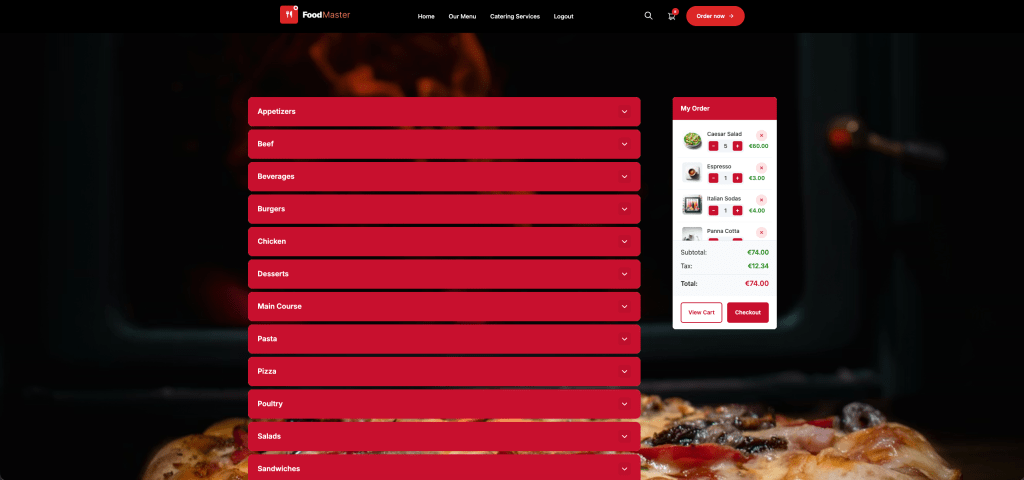
If direct ordering is part of the site, FoodMaster’s WooCommerce restaurant ordering system is a natural fit for an online menu with delivery, pickup, and dine-in ordering. It supports commission-free orders, although payment processing and other operating costs still apply. The SEO benefit depends on accessible pages and useful content—not installing a plugin alone.
Create separate pages for real differences
Two physical restaurants justify two location pages with their own addresses, hours, photographs, directions, and relevant menus. Give each page a distinct URL and link to it from a visible locations section.
A single kitchen serving ten neighborhoods doesn’t automatically justify ten pages. Usually, one detailed delivery page works better. Avoid doorway pages that swap neighborhood names while funneling everyone to the same destination without adding useful information.
[IMAGE: Annotated mobile restaurant location page showing entrance directions, step-free access details, HTML pizza menu categories, delivery coverage, and a clear pickup ordering button]
Add Restaurant Structured Data and Check It for Errors
Structured data gives machines an explicit description of information on your website. For a restaurant, the relevant Schema.org type is usually Restaurant, a subtype of FoodEstablishment within the LocalBusiness hierarchy. Use the most accurate supported type rather than defaulting to something unnecessarily broad.
It doesn’t replace visible content. If your markup says the kitchen is open until midnight while the page says 10 p.m., you’ve created a contradiction, not an optimization.
Add one coordinated description of the business
Use a suitable schema-capable plugin, or have a developer implement JSON-LD through a maintained integration. Avoid editing a parent theme directly, where an update could remove the work. Before adding anything, inspect what your theme and existing plugins already generate.
For a single-location restaurant, configure the name, canonical website URL, telephone with country code, and a structured postal address. Add accurate opening hours using openingHoursSpecification, a public menu URL using hasMenu, and cuisine information using servesCuisine. Include representative images and verified coordinates where appropriate.
Schema.org property names and plugin field labels may differ. Check the generated output rather than assuming a field labeled “menu” produces the intended property. Mark up regular business hours accurately; don’t silently substitute delivery hours for the restaurant’s customer-facing opening hours.
For multiple branches, describe each location separately on its corresponding page. Give each branch a stable @id so connected markup can refer to the same entity consistently. Shared branding doesn’t make two street addresses one business location.
Validate the vocabulary and Google eligibility separately
The Schema Markup Validator checks whether your structured data uses Schema.org vocabulary correctly. Google’s Rich Results Test evaluates markup against Google-supported search features. Passing one test doesn’t mean every property qualifies for a Google enhancement.
Use Google’s Local Business structured-data documentation to check current requirements and recommendations. A technically valid Restaurant description still needs to satisfy Google’s policies, page-access requirements, and feature-specific rules.
After publishing, test the live URL. Inspect the HTML and search for application/ld+json, then check other structured-data output if present. Multiple blocks aren’t automatically wrong: an Organization, Restaurant, and WebSite can coexist. The problem is conflicting entities or duplicated restaurant descriptions with different addresses, hours, or identifiers.
Compare the results against the visible page and Business Profile. Repeat this after changing SEO plugins, themes, or location details. Structured data is easy to forget precisely because customers don’t normally see it.
Schema doesn’t guarantee higher rankings or review stars. Google’s rules exclude self-serving LocalBusiness and Organization reviews from review-star eligibility, including reviews displayed through third-party widgets on the business’s own site. Don’t add ratings expecting a shortcut to stars.
Measure Local SEO Results and Maintain Your Listings
Measure whether people find the right pages and take useful actions—not just whether one keyword moved upward on your laptop. Local results vary with the searcher’s location, query, and context. Searching from inside your restaurant isn’t a neutral citywide ranking test.
In Search Console, review queries and landing pages together. Separate branded searches from discovery searches such as “pizza delivery Headingley.” Watch impressions, clicks, click-through rate, and average position, but remember that average position aggregates different searches and circumstances.
A delivery page gaining relevant impressions without clicks may need a clearer title or offer. A page with little visibility deserves an indexing and content check before another round of keyword edits.
Business Profile performance can show available interactions such as website clicks, direction requests, and call-button clicks. These aren’t interchangeable with completed visits, answered calls, or orders. Available metrics depend on your profile and supported features.
For GA4, add consistent UTM parameters to profile destination links where supported. For example, use utm_source=google, utm_medium=organic, and utm_campaign=gbp_headingley. Use a content label to distinguish menu and ordering links, and verify that redirects preserve the parameters.
Review those campaign visits alongside your existing conversion reporting. Consent choices and tracking restrictions mean GA4 won’t capture every visit. Avoid putting campaign tags on internal website links.
Your monthly maintenance check
- Open every profile website, menu, and ordering link on mobile.
- Reconcile regular hours, upcoming special hours, addresses, and telephone numbers.
- Read and respond to reviews without exposing customer information.
- Check important URLs for indexing problems and revisit schema after changes.
- Test branch selection, delivery eligibility, menu readability, and checkout usability.
The strongest local setup is one you can keep accurate during a busy service. Clear pages, current listings, and a dependable ordering path give searchers something better than another optimized paragraph: confidence that they’ve found the right restaurant.
Commission-free ordering
Run restaurant orders on your own WordPress site
FoodMaster adds delivery, pickup, dine-in, POS, and kitchen tools — with zero per-order fees.