
WPSlash Licences

Create, print, and track Speedex vouchers from WooCommerce

Generate Speedex shipping tickets from WooCommerce orders, print them one at a time or in bulk, cancel or track vouchers, and keep delivery status in sync, without leaving your store.

5/5 from 3 reviews

$129one site, updates and support includedGet Speedex

Needs Speedex Courier Web Services credentials. 30-day money-back guarantee.

  • Create, print, cancel, and track Speedex vouchers from WooCommerce
  • Single and bulk printing, plus automatic tracking emails
  • Multiple Speedex Web Services credentials for multi-branch stores

What it does

Speedex Courier Voucher for WooCommerce creates, prints, cancels, and tracks Speedex shipping tickets from your orders. It can email tracking numbers automatically and update order status to Delivery Completed or Delivery Denied, so fulfillment stays inside WooCommerce instead of a separate Speedex screen.

You save your Speedex Web Services credentials in WooCommerce once. Stores with more than one Speedex contract can run multiple instances side by side.

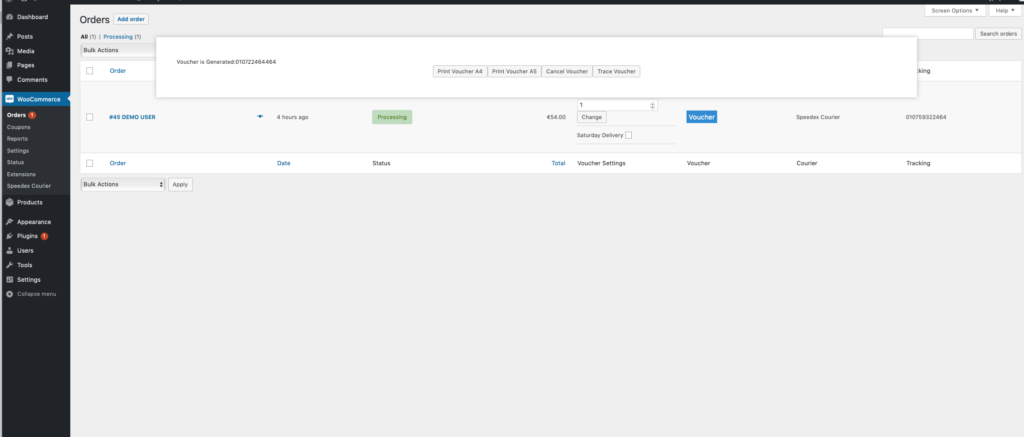
From the order screen you can

  • Create Speedex vouchers (shipping tickets) from WooCommerce orders
  • Print a single voucher or print in bulk, in all voucher sizes Speedex Courier supports
  • Cancel vouchers when a shipment should not go out
  • Track vouchers and check shipment progress
  • Email the Speedex tracking number automatically

How it works

  1. 1

    Add Speedex credentials

    Save your Speedex Web Services credentials in WooCommerce. Stores with more than one Speedex contract can run multiple instances side by side.

  2. 2

    Create vouchers from orders

    Generate Speedex shipping tickets from the WooCommerce order screen, one at a time or automatically as you fulfill orders.

  3. 3

    Print, track, and update status

    Print vouchers, email tracking numbers, follow the shipment from WooCommerce, and let delivered or denied parcels update the order status.

Requirements

Requirements for Speedex Courier Voucher
WhatVersion or note
WooCommerce3.4 or later
Courier accountSpeedex Courier Web Services credentials
Where it worksStores shipping with Speedex in Greece
Speedex$129Get Speedex

What comes with the licence

A year of updates

Activated inside the plugin, delivered through your WordPress dashboard.

Full, unencoded PHP

No ionCube and no remote calls you cannot read.

Support within a day

From the people who wrote the plugin, through a support ticket.

30-day money-back

Tell us what did not work and we refund the order.

Before you install

Six things people ask before buying this one. Anything else, submit a ticket. We reply within a day.

Submit a ticket
Do I need Speedex credentials?

Yes. You need Speedex Courier Web Services credentials to create, print, cancel, and track vouchers from WooCommerce.

Can I use multiple different credentials?

Yes. You can run multiple Speedex instances if you have more than one set of credentials.

What can I do with Speedex vouchers from WooCommerce?

Create vouchers, print them (single or bulk, in the sizes Speedex supports), cancel vouchers, and track shipments from the WooCommerce order screen.

Does the plugin email tracking numbers automatically?

Yes. It can send an automatic email with the Speedex tracking number.

Are WooCommerce order statuses updated automatically?

Yes. Order status can change to Delivery Completed or Delivery Denied based on Speedex shipment status.

What are the requirements?

WooCommerce 3.4 or later and Speedex Courier Web Services credentials. The plugin is built for stores shipping with Speedex in Greece.

Start creating Speedex vouchers today

Create, print, cancel, and track shipping tickets, and keep delivery status inside WooCommerce.

Get Speedex$129 for one site, 30-day money-back