
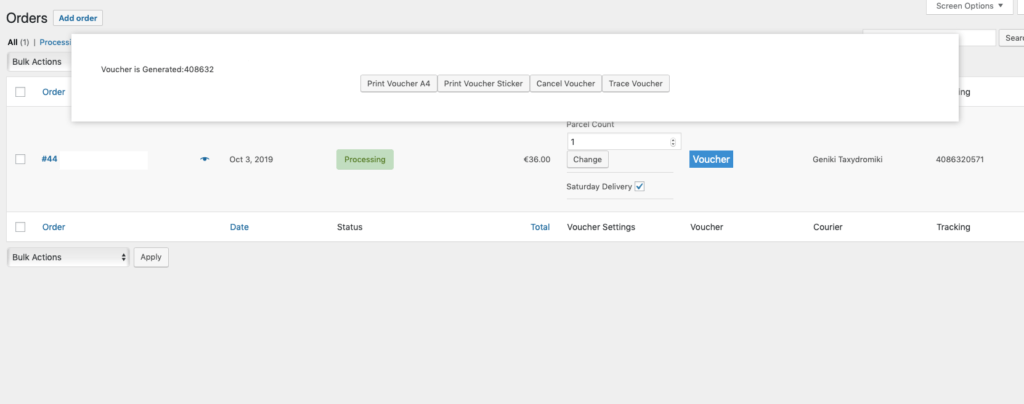
What it does
Geniki Taxydromiki Voucher for WooCommerce creates, prints, cancels, and tracks shipping tickets from your orders. It can email tracking numbers automatically and update order status to Delivery Completed or Delivery Denied.
Connect Geniki Taxydromiki Web Services once, then generate shipping tickets from WooCommerce instead of switching between systems.
From the order screen you can
- Create Geniki Taxydromiki vouchers (shipping tickets) from WooCommerce orders
- Print a single voucher or print in bulk, in the sizes Geniki Taxydromiki supports
- Cancel vouchers when a shipment should not go out
- Track vouchers and check shipment progress
- Send an automatic email with the Geniki Taxydromiki tracking number
How it works
- 1
Add Geniki credentials
Save your Geniki Taxydromiki Web Services credentials in WooCommerce. Stores with more than one contract can run multiple instances side by side.
- 2
Create vouchers from orders
Generate Geniki Taxydromiki shipping tickets from the WooCommerce order screen, one at a time or automatically as you fulfill orders.
- 3
Print, track, and update status
Print vouchers, email tracking numbers, follow the shipment from WooCommerce, and let delivered or denied parcels update the order status.
Requirements
| What | Version or note |
|---|---|
| WooCommerce | 3.4 or later |
| WooCommerce HPOS | Compatible with High-Performance Order Storage |
| Geniki Taxydromiki | Web Services credentials |
| Licence | A wpslash.com licence key, activated in WordPress |