
What it does
Elta Courier Voucher for WooCommerce creates, prints, cancels, and tracks Elta shipping tickets from your orders. It can email tracking numbers automatically and create a voucher when an order is marked complete, so fulfillment stays inside WooCommerce instead of a separate Elta screen.
Save your Elta credentials in WooCommerce. Stores with more than one Elta contract can run multiple instances side by side. SOAP must be enabled on the server.
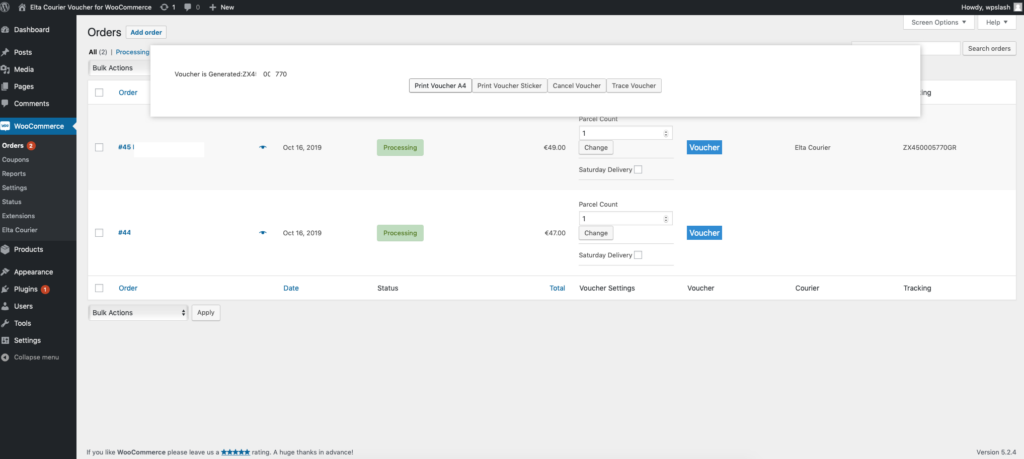
From the order screen you can
- Create Elta vouchers (shipping tickets) from WooCommerce orders
- Print a single voucher or print in bulk, in all voucher sizes Elta Courier supports
- Cancel vouchers when a shipment should not go out
- Track vouchers and check shipment progress
How it works
- 1
Request Elta credentials
Ask your local Elta Courier branch for Web Services access. You can also call (0030) 210-607-3000 or email [email protected].
- 2
Add one or more Elta accounts
Save credentials in WooCommerce. Stores with more than one Elta contract can run multiple instances side by side. SOAP must be enabled on the server.
- 3
Create, print, and track
Generate vouchers from orders, or automatically when an order is completed, then print them, send tracking by email, and follow the shipment from WooCommerce.
Requirements
| What | Version or note |
|---|---|
| WooCommerce | 3.4 or later |
| SOAP | Installed and enabled on the server |
| Courier account | Elta Courier Web Services credentials |
| Order storage | Compatible with WooCommerce High-Performance Order Storage (HPOS) |