
WPSlash

Disable REST API Caching when using WooFood

Wednesday April 29, 2020

WooFood Automatic Printing software using WordPress REST API to fetch orders.

If you using a caching plugin you must be sure that you have excluding caching on REST API. With other words, you should exclude URLs including wp-json , because caching REST API orders will make AutoPrint software getting the same data until the cache expires.

This may make the AutoPrint software print the same order over and over…

Here are some sample instructions on how to disable REST API Caching on.

Disable Rest API Caching on Litespeed
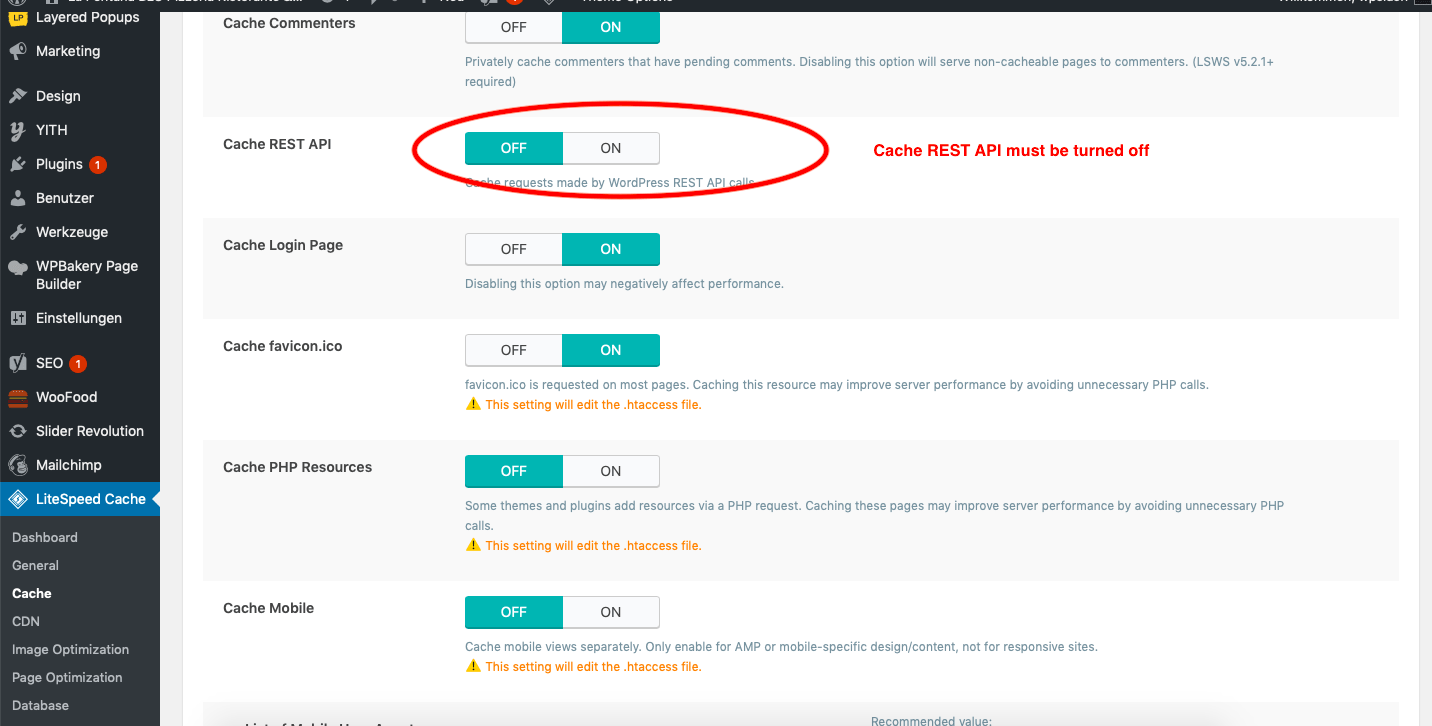
disable rest api caching screenshot
  1. Navigate to Litespeed > Cache
  2. Be sure that Cache REST API is OFF
  3. Save Settings and you are ready to go!

Disable REST API Caching on Cloudflare
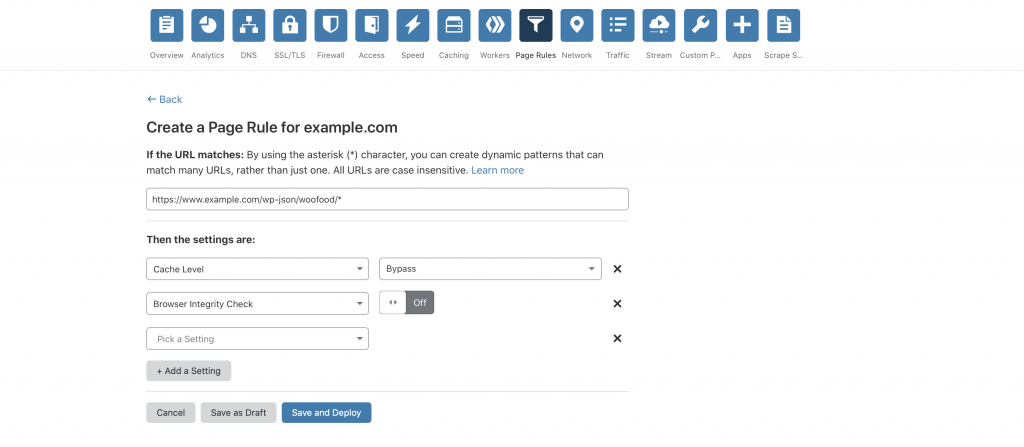
disable rest api caching cloud flare screenshot wordpress
  1. Navigate to Page Rules
  2. In the section If the url matches type this url https://www.example.com/wp-json/woofood/* by replacing example.com with your actual domain name
  3. Set Cache Level to Bypass
  4. Set Browser Integrity Check to Bypass
  5. Press Save and Deploy and you are ready!

Leave a Comment

Your email address will not be published. Required fields are marked *

Related Articles

Tutorials

How to Set Up a Staging Environment for Your WooCommerce Restaurant Website: Safely Test Menu Changes, Plugin Updates, and Checkout Fixes Without Breaking Your Live Ordering System (Complete Guide)

What Is a Staging Site and Why Every WooCommerce Restaurant Needs One Picture this: it’s Friday at 6:30 PM. Your restaurant is slammed with online orders, and you decide to quickly update your menu plugin. The screen goes white. Your checkout page throws a fatal error. For the next 45 minutes — during your most […]
April 8, 2026
Tutorials

How to Set Up Automated Backup and Disaster Recovery for Your WooCommerce Restaurant Website: Protect Orders, Menus, and Customer Data from Crashes, Hacks, and Human Error (Complete Guide)

Why Restaurant Websites Need a Bulletproof Backup Strategy Picture this: it’s 6:30 PM on a Friday, your busiest night of the week. Orders are pouring in through your WooCommerce restaurant site, the kitchen is humming, and then — nothing. Your website goes dark. Maybe a plugin update went sideways. Maybe your hosting provider had a […]
April 7, 2026
Tutorials

How to Build a Customer Loyalty and Rewards Program for Your WooCommerce Restaurant: Points, Punch Cards, and VIP Tiers to Drive Repeat Orders (Complete Guide)

Why Restaurant Loyalty Programs Matter for Online Ordering A customer places their first order through your restaurant’s website. The food arrives hot, the experience is seamless, and they’re satisfied. But will they come back? Without a deliberate strategy to encourage repeat visits, there’s a strong chance they’ll drift to a competitor or default back to […]
April 7, 2026