
Trendyol Integration for WooCommerce

Sell on Trendyol Marketplace directly from WooCommerce

Connect your online store with Trendyol International. Export your WooCommerce catalog, import marketplace orders in real time, and keep stock and prices synchronized automatically — without leaving WordPress.

  • Sell across Romania, Greece, the UAE, and Saudi Arabia.
  • Real-time orders with automatic stock and price synchronization.
  • Manage catalog, fulfillment, returns, and invoices in WooCommerce.

4 marketplaces supported

Real-time order delivery

Automatic stock and price sync

WooCommerce dashboard management

From connection to synchronized selling

Connect your credentials, map your WooCommerce catalog, and manage Trendyol sales from one familiar dashboard.

1

Connect Trendyol

Add your Seller ID, API key, and Storefront Code, then configure secure webhook authentication.

2

Map and export

Map categories, brands, attributes, and VAT rates, validate required data, then export products in controlled batches.

3

Sell and synchronize

Receive orders, update fulfillment, send invoices, and synchronize inventory and pricing automatically.

Everything you need to sell on Trendyol

Catalog management, orders, inventory, fulfillment, returns, and invoices — integrated directly into WooCommerce.

Product export and catalog management

  • Export simple and variable WooCommerce products
  • Chunked export with real-time progress tracking
  • WooCommerce-to-Trendyol category mapping
  • Brand mapping with live Trendyol search
  • Per-category attribute and term-level mapping
  • Required attribute validation before export
  • Filter exports by category, brand, stock, or limit
  • Automatic SKU generation
  • Default and per-category VAT rates
  • Batch status results and error messages
  • Bulk catalog deletion for testing and cleanup

Real-time order synchronization

  • Automatic Trendyol webhook registration
  • 30-minute WP-Cron fallback polling
  • Picking, Invoiced, and Shipped status mapping
  • Trendyol “TY” badge in WooCommerce Orders
  • Manual import for the previous 1–30 days
  • Refetch by Trendyol order number
  • Resettable order synchronization cursor
  • API Key or Basic Auth webhook security
  • Configurable webhook order statuses

Stock and price synchronization

  • Push stock automatically when inventory changes
  • Push prices automatically after product updates
  • Simple and variable product support
  • Debounced batches to limit API requests
  • Manual bulk stock and price updates

Order management and fulfillment

  • Manage Picking → Invoiced → Shipped in WooCommerce
  • Add tracking and carrier information
  • Cancel individual items with reason codes
  • Print Trendyol shipping vouchers
  • Approve or reject returns and claims
  • Upload invoice PDFs or provide invoice URLs
  • Automatic invoice sending

Invoice integration

  • WooCommerce PDF Invoices & Packing Slips
  • WPO WooCommerce PDF Invoices
  • Billingo invoicing
  • Germanized for WooCommerce
  • Custom invoice meta key support
  • Send invoices when they become available

Control Trendyol from WordPress

Replace the placeholders below with your product screenshots directly in the block editor.

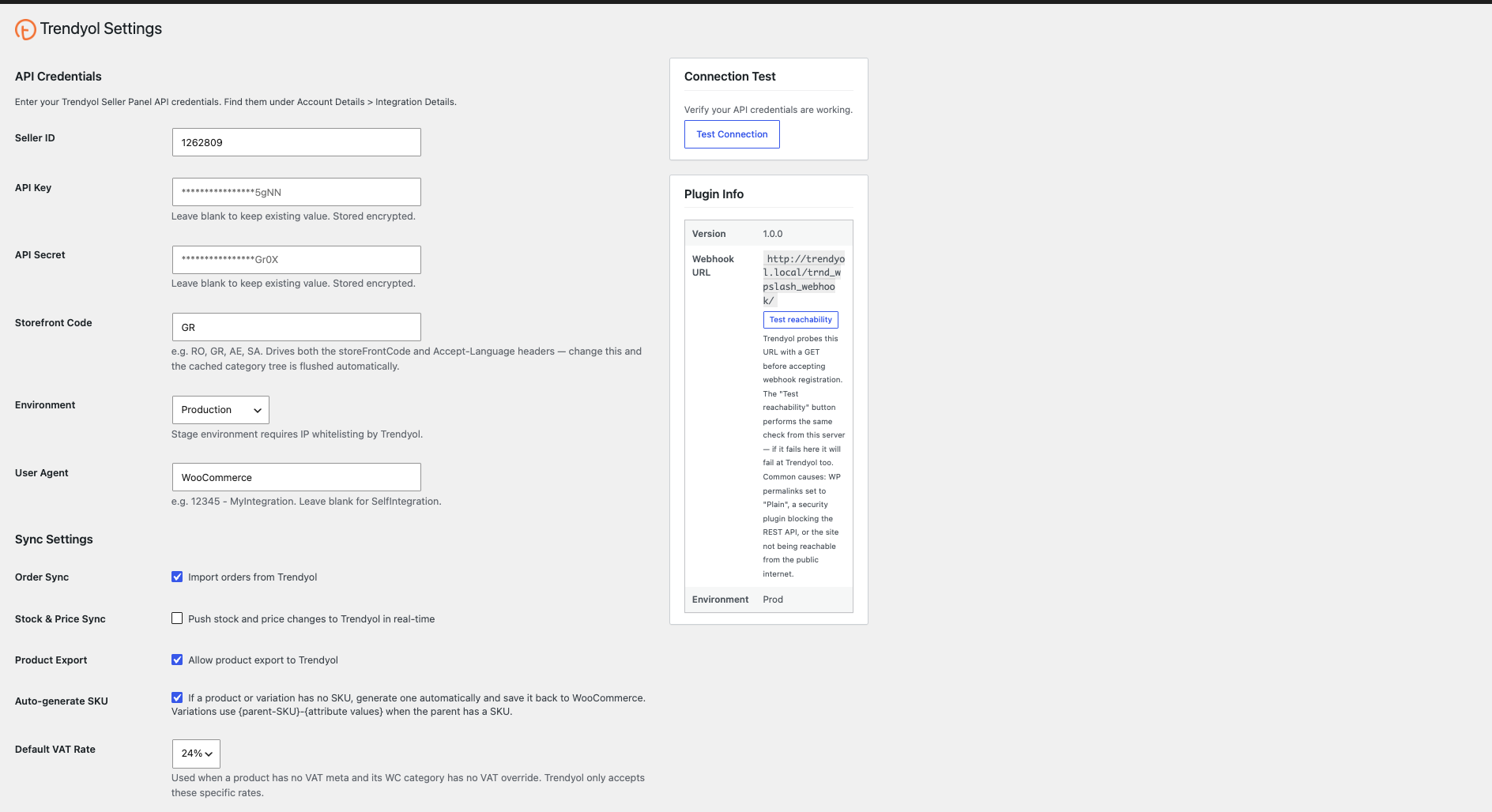
API settings

Trendyol for WooCommerce API settings with Seller ID, API Key, and Storefront Code configuration.

Category mapping

WooCommerce-to-Trendyol category assignments with category, brand, and attribute mapping controls.

Trendyol Integration for WooCommerce handles product export, order synchronization, stock management, invoice delivery, and catalog administration — everything required to sell on Trendyol International from a single WooCommerce plugin.

Start selling on Trendyol from WooCommerce

Connect your catalog, synchronize orders and inventory, and manage fulfillment from WordPress.

Less than $0.35 a day — recovered from a single commission-free order

Trendyol for WooCommerce

$129.00
✓ Secure checkout · 30-day money-back guarantee

Try Trendyol Integration risk-free for 30 days

Install it, use it on a real project, and ask for a full refund within 30 days if it is not right for you.

Everything you need to know

Common questions about connecting WooCommerce with Trendyol International.

Which Trendyol marketplaces does this plugin support?

The integration supports Trendyol International marketplaces in Romania, Greece, the United Arab Emirates, and Saudi Arabia.

Do I need a Trendyol seller account to use this plugin?

Yes. You need an active Trendyol seller account and valid Seller ID, API key, and Storefront Code credentials.

Does the plugin import products from Trendyol into WooCommerce?

No. WooCommerce remains your product source. The plugin exports your WooCommerce catalog to Trendyol and keeps marketplace data synchronized.

How are Trendyol orders delivered to WooCommerce?

Orders arrive through automatically registered webhooks. A WP-Cron process also checks for new orders every 30 minutes as a fallback.

Does my site need HTTPS for the plugin to work?

HTTPS is strongly recommended and normally required for secure, reliable webhook delivery and protection of your Trendyol API credentials.

Is the plugin compatible with WooCommerce HPOS?

Yes. The integration works with WooCommerce High-Performance Order Storage for modern, scalable order management.

What happens when I change a product’s price or stock in WooCommerce?

The updated stock or price is queued and pushed to Trendyol automatically. Debounced batch processing prevents unnecessary API requests during bulk changes.

Do I need to map categories and brands before exporting?

Yes. Products must be assigned to the appropriate Trendyol category and brand. Required attributes are validated before export to prevent marketplace rejections.

Can I manage Trendyol order fulfillment from WooCommerce?

Yes. Move orders through Picking, Invoiced, and Shipped states, add tracking details, cancel items, print vouchers, and manage returns from WooCommerce.

Which invoice plugins are supported?

Supported integrations include WooCommerce PDF Invoices & Packing Slips, WPO WooCommerce PDF Invoices, Billingo, and Germanized for WooCommerce. A custom meta key can connect other invoice plugins.

Where can I find error logs if something goes wrong?

Review the product batch status and Trendyol error messages first, then check the integration logs in your WooCommerce logging area for additional request details.

Connect WooCommerce to Trendyol today

Map your catalog, synchronize operations, and start selling across Trendyol International without juggling multiple dashboards.

  • 30-Day Money-Back Guarantee
  • Premium Support Included
  • Regular Updates
×

🔥 ONE DAY ONLY OFFER 🔥

Upgrade FoodMaster Today

Normally your license is limited to 1 Website.

Today only, get a LIFETIME Unlimited Websites License for just:
$499

✔ Unlimited Client Websites
✔ Unlimited Personal Projects
✔ Future Updates Included
✔ Save Hundreds on Additional Licenses

Offer Ends In: