
WPSlash

Disable REST API Caching when using WooFood

Wednesday April 29, 2020

WooFood Automatic Printing software using WordPress REST API to fetch orders.

If you using a caching plugin you must be sure that you have excluding caching on REST API. With other words, you should exclude URLs including wp-json , because caching REST API orders will make AutoPrint software getting the same data until the cache expires.

This may make the AutoPrint software print the same order over and over…

Here are some sample instructions on how to disable REST API Caching on.

Disable Rest API Caching on Litespeed
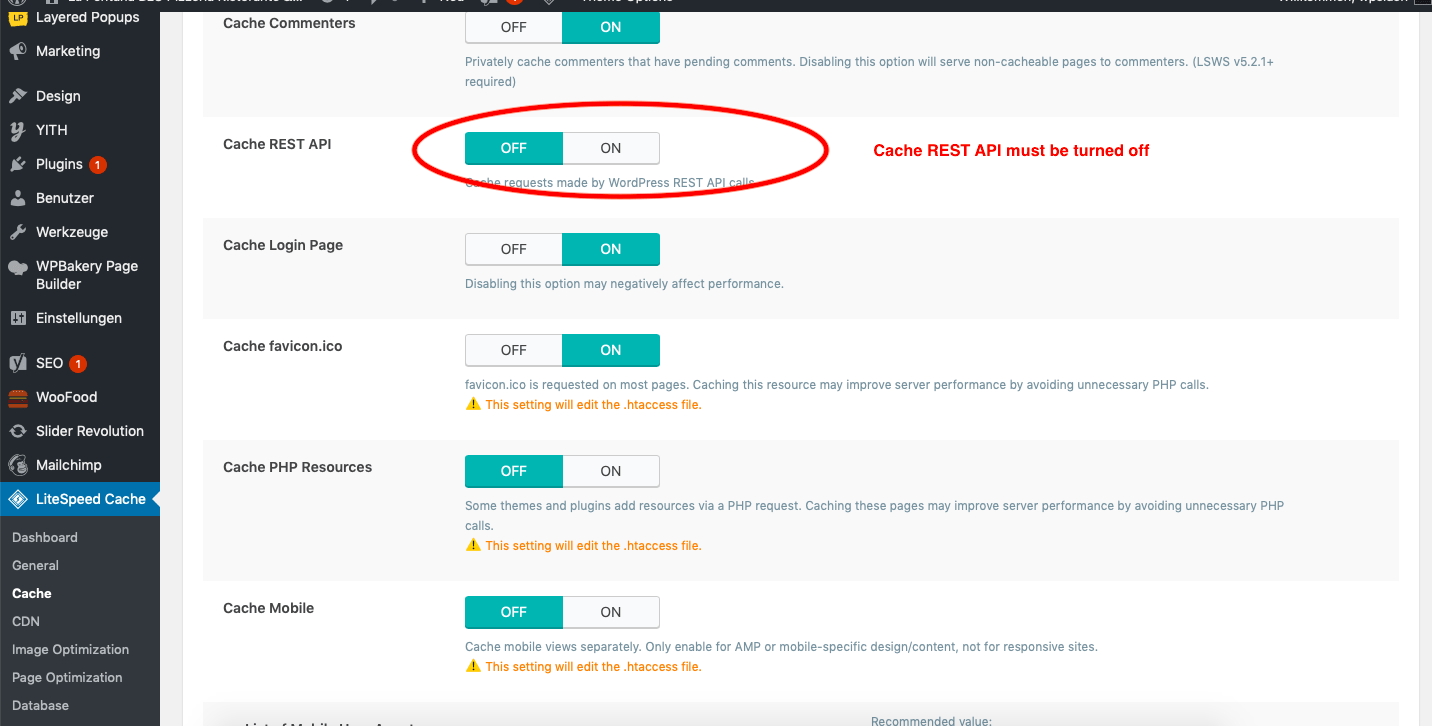
disable rest api caching screenshot
  1. Navigate to Litespeed > Cache
  2. Be sure that Cache REST API is OFF
  3. Save Settings and you are ready to go!

Disable REST API Caching on Cloudflare
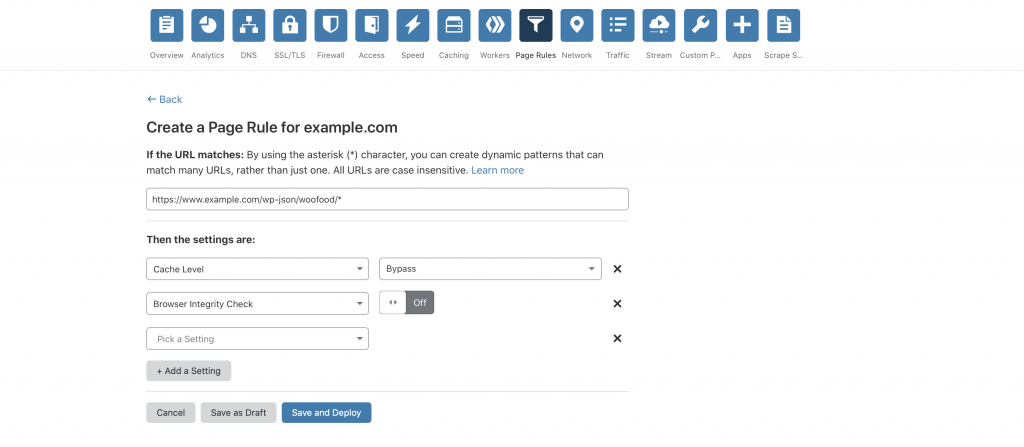
disable rest api caching cloud flare screenshot wordpress
  1. Navigate to Page Rules
  2. In the section If the url matches type this url https://www.example.com/wp-json/woofood/* by replacing example.com with your actual domain name
  3. Set Cache Level to Bypass
  4. Set Browser Integrity Check to Bypass
  5. Press Save and Deploy and you are ready!

Leave a Comment

Your email address will not be published. Required fields are marked *

Related Articles

Tutorials

How to Make Your WooCommerce Restaurant Ordering Website ADA Compliant and Accessible: Screen Reader Optimization, Keyboard Navigation, and WCAG 2.1 Guidelines for Online Menus and Checkout (Complete Guide)

Why Accessibility and ADA Compliance Matter for Restaurant Ordering Websites A customer with low vision tries to order dinner from your restaurant website. They navigate to your menu, but their screen reader can’t parse the item names because they’re embedded in images without alt text. The “Add to Cart” button is invisible to keyboard navigation. […]
April 5, 2026
Tutorials

How to Add Restaurant Schema Markup to Your WordPress Menu Pages: Rich Snippets for Menu Items, Pricing, Reviews, and Cuisine Type to Boost Click-Through Rates in Google Search (Complete Guide)

What Is Restaurant Schema Markup and Why It Matters for Your WordPress Food Ordering Site When someone searches “best margherita pizza near me,” Google doesn’t just show ten blue links anymore. It pulls star ratings, price ranges, cuisine types, and even individual menu items directly into the search results. That extra visual information — called […]
April 5, 2026
Tutorials

How to Optimize Your Restaurant Website for Local SEO with WordPress: Google Business Profile, Schema Markup, and Location-Based Keywords to Rank #1 in ‘Near Me’ Searches (Complete Guide)

Why Local SEO Is the #1 Growth Channel for Restaurant Websites When someone types “Thai food near me” or “best pizza delivery in Brooklyn” into Google, they’re not casually browsing — they’re ready to order. According to Google’s own data, roughly 46% of all searches carry local intent, and “near me” searches related to food […]
April 4, 2026