
If you’re searching for a way to print WooCommerce orders automatically, you’re likely running a store where speed matters. In restaurants, food delivery businesses, and high-volume shops, manually opening each order and clicking “Print” simply doesn’t scale. You need a system where new orders are printed instantly, without anyone logging into wp-admin.
FoodMaster makes it possible to automatically print your WooCommerce orders the moment they are received. Instead of relying on manual steps, the system connects your store with the FoodMaster Automatic Order Printing Software and sends tickets directly to your selected printer.
This guide explains how to configure automatic printing, choose what details appear on tickets, and include custom order meta fields in your print layout.
How to Print WooCommerce Orders Automatically with FoodMaster
After installing and activating FoodMaster inside WordPress, the next step is configuring the Automatic Order Printing Software included with the plugin. This desktop application handles the communication between your WooCommerce store and your local or network printer.
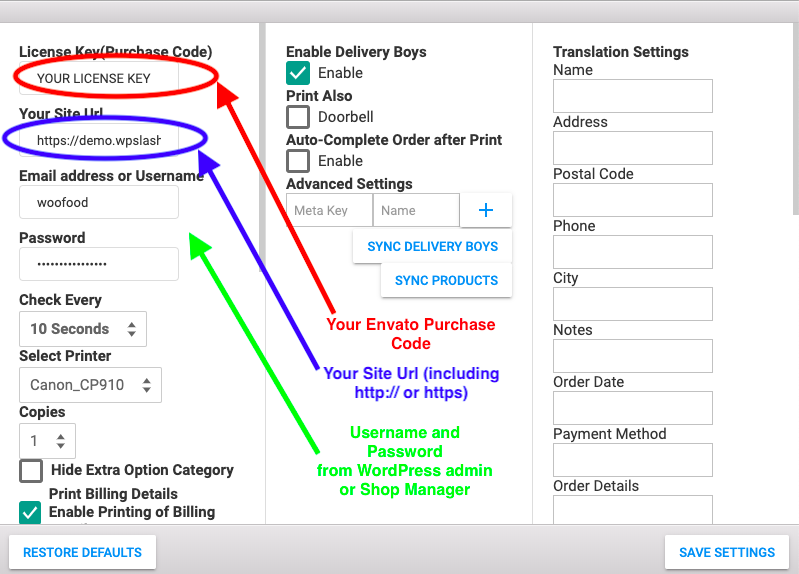
Open the printing application and navigate to Settings. This is where you connect your WooCommerce store and define which printer will handle automatic order printing.
You will need to fill in the required details:
- License Key
- Your WooCommerce site URL
- An Administrator username
- The corresponding password
- Select the Printer that should print orders automatically
Once saved, FoodMaster securely connects to your store. From that point on, whenever an order reaches the defined status (for example, Processing), it will be sent directly to the selected printer without manual interaction.
Choose What Information Gets Printed on WooCommerce Order Tickets
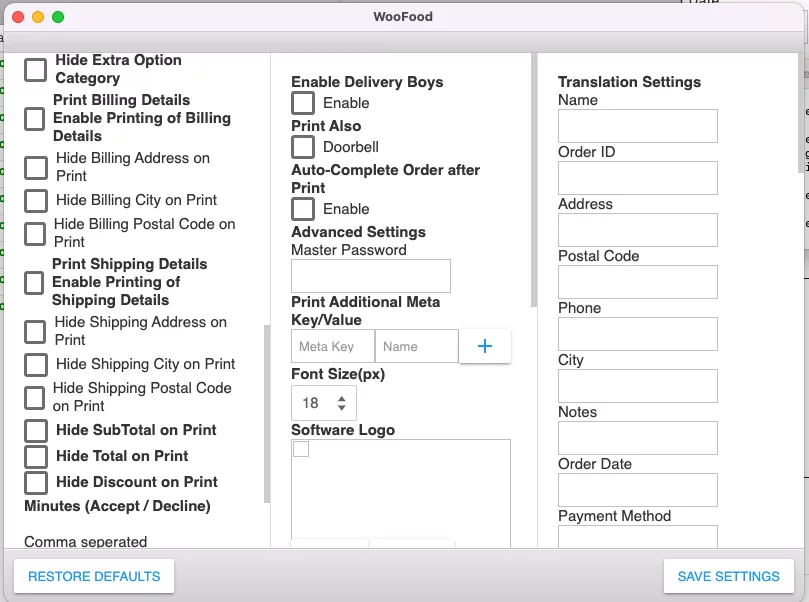
Automatic printing is only useful if the printed ticket contains the right information. FoodMaster allows you to control exactly what appears on your WooCommerce order receipts and kitchen tickets.
You can enable or disable fields such as:
- Billing details
- Shipping details
- Order total
- Subtotal
- Discounts
- Payment method
- Customer notes
For example, in a kitchen environment you may not need full billing details, but you may want customer notes and item modifiers to be highly visible. You can hide unnecessary fields to keep tickets clean and readable.
This level of customization helps ensure your automatically printed WooCommerce orders are optimized for real-world workflows, not just accounting purposes.
Print Additional Meta Fields Automatically
Many WooCommerce stores use custom checkout fields or additional order metadata. FoodMaster allows you to automatically print these custom meta key/value pairs on your order tickets.
In the Settings screen, locate the option “Print Additional Meta Key/Value”. This feature lets you define custom fields that should appear whenever they exist on an order.
For example, if you have a custom meta key called gift_wrap and you want its value printed:
- Enter gift_wrap in the Meta Key field.
- Enter the label you want displayed (for example, Gift Wrap) in the Name field.
- Click the + button.
- Save your settings.
From that point forward, every time an order includes that meta field, it will automatically be included in the printed ticket.
This is especially useful for restaurant-specific data such as table numbers, pickup times, delivery time slots, allergy notes, preparation instructions, or any custom checkout field added to WooCommerce.
Why Automatic WooCommerce Order Printing Matters
Manually printing orders might work for very small stores. But if your business depends on fast preparation and accurate handoff between online ordering and production, you need a system that prints WooCommerce orders automatically.
With FoodMaster, automatic printing is part of a complete WooCommerce restaurant ordering system that also includes POS functionality and a Kitchen Display System. That means your workflow stays consistent whether orders come from online customers or in-store walk-ins.
If you want to enable automatic WooCommerce order printing for your store, you can learn more about FoodMaster – WooCommerce Restaurant Ordering System.