
Let your dine-in customers scan a QR code at their table, browse your menu on their phone, and place an order — no app download, no waiting for a server. Here is how to set it up with FoodMaster in under 10 minutes.
Why QR Table Ordering?
Post-pandemic dining habits are here to stay. A 2025 Hospitality Technology survey found that 67% of diners prefer ordering from their phone when eating in. QR table ordering removes friction, speeds up table turnover, reduces order errors, and cuts labor costs — all without requiring customers to install anything.
With FoodMaster (formerly WooFood), your WordPress restaurant website becomes a complete ordering platform. The built-in QR Table Ordering feature lets you:
- Generate unique QR codes per table
- Redirect customers straight to your menu
- Lock the order type to dine-in automatically
- Show the table number on the order and receipt
- Print orders to the kitchen automatically
- Support multiple zones (indoor, outdoor, bar, terrace, VIP)
- Work with multi-location setups
- Clear sessions automatically after order completion
What You Need Before Starting
- WordPress website with WooCommerce installed and active
- FoodMaster plugin installed and licensed
- A menu page — the page where your food menu is displayed (using FoodMaster shortcodes or blocks)
- A printer — optional, but recommended if you want orders printed to the kitchen automatically
Step-by-Step Setup Guide
Step 1: Enable QR Table Ordering
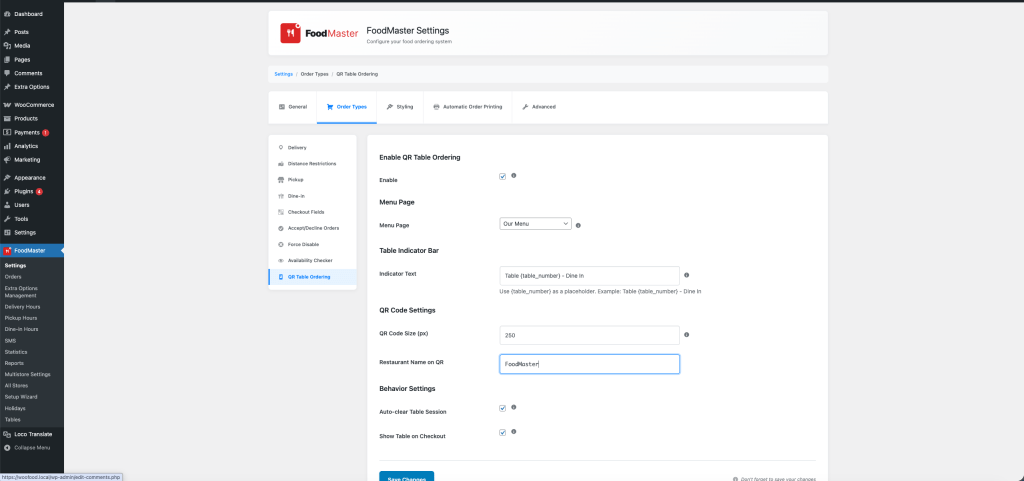
Go to FoodMaster → Settings → Order Types → QR Table Ordering in your WordPress admin.
Check the box next to Enable QR Table Ordering to activate the feature.
Step 2: Select Your Menu Page
In the same settings tab, use the Menu Page dropdown to select the page customers will be redirected to after scanning a QR code. This should be the page that displays your food menu.
When a customer scans a QR code, FoodMaster automatically sets their session to dine-in and associates them with the correct table before redirecting them to this page.
Step 3: Configure Display Options
While still in the QR Table Ordering settings, you can customize:
- Indicator Text — The text shown in the floating bar at the bottom of the screen (e.g., “Table {table_number} – Dine In”). Use
{table_number}as a placeholder. - QR Code Size — The pixel size for downloadable QR images (default: 600px).
- Restaurant Name — Text printed below the QR code image when you download or print it.
- Show Table at Checkout — Display the table number on the checkout page so customers can confirm.
- Auto-Clear Session — Automatically clear the table session when an order is completed, so the next customer starts fresh.
Click Save Changes.
Step 4: Create Your Tables
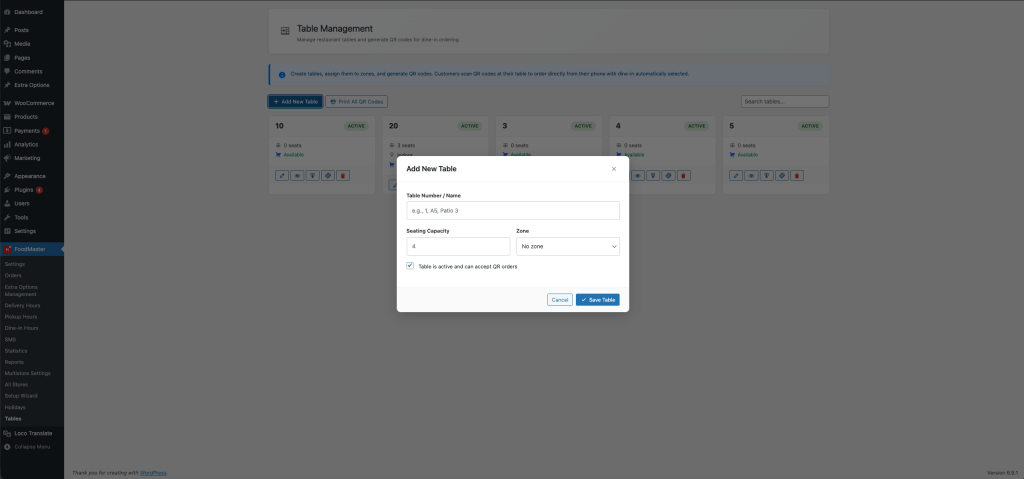
Navigate to FoodMaster → Tables in the admin menu. Click Add New Table and fill in:
- Table Number — Can be a number (1, 2, 3), a label (A5), or a name (Patio 3).
- Capacity — How many guests the table seats (optional, for your reference).
- Zone — Indoor, Outdoor, Bar, Terrace, or VIP.
- Store — If you use multi-location, assign the table to a specific store.
A unique QR URL token is automatically generated for each table. Click Save.
Step 5: Download and Print QR Codes
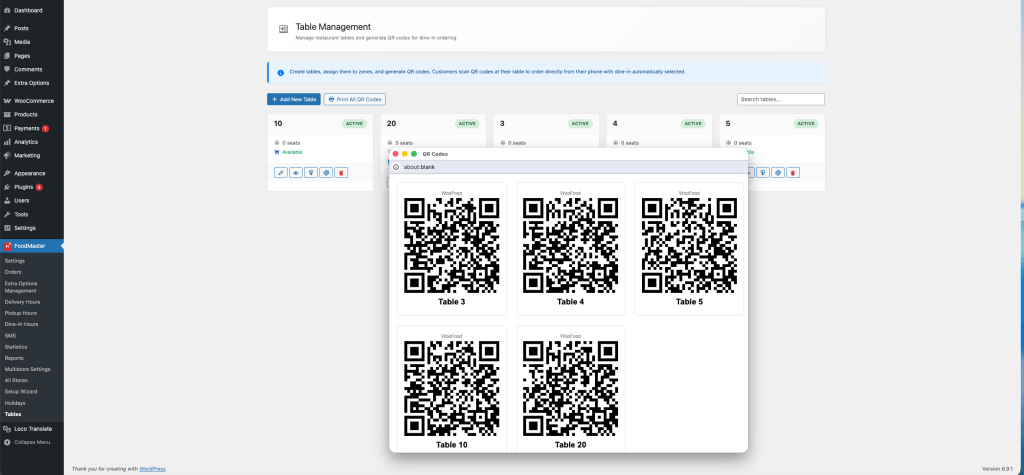
Back on the Tables list, you will see each table with its QR code preview. You have three options:
- Copy URL — Copy the QR link to share or use in your own materials.
- Download PNG — Download a high-resolution QR image with your restaurant name printed below it.
- Print All — Use the bulk print button to generate a printable sheet of all active table QR codes at once.
Print the QR codes, laminate them, and place one on each table. Tabletop stands or stickers work great.
Step 6: Test the Flow
Use your phone to scan one of the QR codes. You should be:
- Redirected to your menu page
- See a floating indicator bar at the bottom showing the table number
- Have the order type automatically set to dine-in
- See the table number at checkout (if enabled)
Place a test order to confirm everything works, including kitchen printing if you have it configured.
If you have FoodMaster’s Kitchen Display System (KDS) enabled, dine-in orders from QR scans will appear on the kitchen screen with the table number clearly visible. Staff can track preparation and mark orders as ready.
How It Works Behind the Scenes
When a customer scans the QR code, this is what happens:
- The phone opens a URL like
yoursite.com/?woofood_table=t-a3x7k9m2 - FoodMaster looks up the table by its unique token
- A WooCommerce session is created with the table ID, table number, and order type set to dine-in
- The customer is redirected to your menu page
- They browse, add items to cart, and check out normally
- The table number is saved to the order and appears in the admin, on receipts, in emails, and on the KDS
No app download. No login required. The customer just scans and orders.
Best Practices for QR Table Ordering
Keep Your Menu Mobile-Friendly
Since 100% of QR orders come from phones, make sure your menu page looks great on mobile. FoodMaster’s built-in menu templates are already responsive, but double-check your theme does not break the layout on small screens.
Use Clear Table Numbers
Match the table number in FoodMaster exactly to what is physically displayed at the table. If the table says “12”, do not label it “Table 12” in the system — just use “12” to avoid confusion for staff.
Enable Auto-Clear Sessions
Turn on the Auto-Clear Session setting so that after a customer’s order is completed, the next person who scans the same QR code starts with a fresh cart. This prevents session conflicts.
Combine with Automatic Printing
For the best experience, pair QR table ordering with FoodMaster’s automatic order printing. New dine-in orders go straight to the kitchen printer with the table number on the receipt — zero manual steps.
Make sure your QR codes are large enough to scan easily. We recommend printing them at least 3cm x 3cm (about 1.2 inches). The default 600px size works well for standard print.
Multi-Location Support
If you operate multiple restaurant locations with FoodMaster’s multi-store feature, each table can be assigned to a specific store. When a customer scans a QR code at Location B, FoodMaster automatically sets their session to that store — showing the correct menu, hours, and delivery options for that branch.
Frequently Asked Questions
Do customers need to download an app?
No. QR table ordering works entirely through the phone’s camera and web browser. No app download is required.
Can I use QR ordering alongside delivery and pickup?
Absolutely. FoodMaster supports all three order types simultaneously. QR scans automatically set the order type to dine-in, while your website continues accepting delivery and pickup orders as normal.
What if a customer scans an inactive table?
If a table is marked as inactive in the admin, the QR scan will not set a table session. You can enable or disable tables at any time from the Tables management page.
Can I customize the QR code design?
The downloaded QR PNG includes your restaurant name below the code. For custom branding (logo in center, colors), you can use the generated URL with any external QR design tool.
Does it work with WooCommerce payment gateways?
Yes. Dine-in orders use the standard WooCommerce checkout, so any payment gateway you have configured (Stripe, PayPal, cash, etc.) works automatically.
How does the kitchen know which table the order is for?
The table number is saved to the order and displayed on printed receipts, in the admin order view, in customer emails, and on the Kitchen Display System (KDS).
Ready to Add QR Table Ordering to Your Restaurant?
FoodMaster includes QR table ordering, automatic printing, KDS, POS, delivery, pickup, and more — all in one plugin. No commissions, no monthly fees.
Wrapping Up
QR table ordering is one of the easiest wins for any restaurant. It reduces wait times, eliminates order errors from miscommunication, and gives your customers a modern, frictionless dining experience.
With FoodMaster, the entire setup takes less than 10 minutes: enable the feature, create your tables, print QR codes, and you are live. No third-party services, no recurring fees, and no app for customers to install.
If you have questions about setting up QR table ordering or any other FoodMaster feature, open a support ticket and our team will help you get started.